Modern web apps don’t “break tests” because selectors are bad.
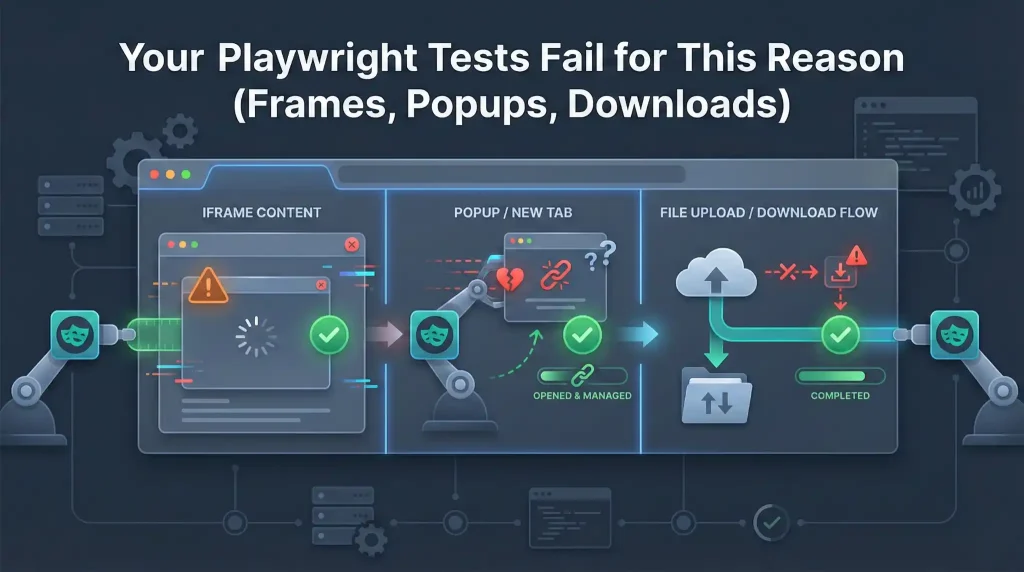
They break tests because the UI keeps changing context:
- iFrames (payments, chat widgets, embedded dashboards)
- Popups / new tabs (SSO providers, help centers, previews)
- Uploads & downloads (reports, resumes, exports)
In older tools, these were classic flake zones: you’d switch context manually, race the DOM, and hope nothing refreshed mid-step.
Playwright takes a different approach.
You don’t “switch” the old-school way—you use first-class APIs built for exactly these scenarios.
In this guide, we’ll cover:
- frameLocator() for stable iframe interactions
- Uploads with setInputFiles() and the filechooser pattern
- Downloads using Promise.all() (and why saveAs() matters for CI)
- Popups and handling multiple pages predictably

Code examples below use Playwright Test style.
import { test, expect } from ‘@playwright/test’;
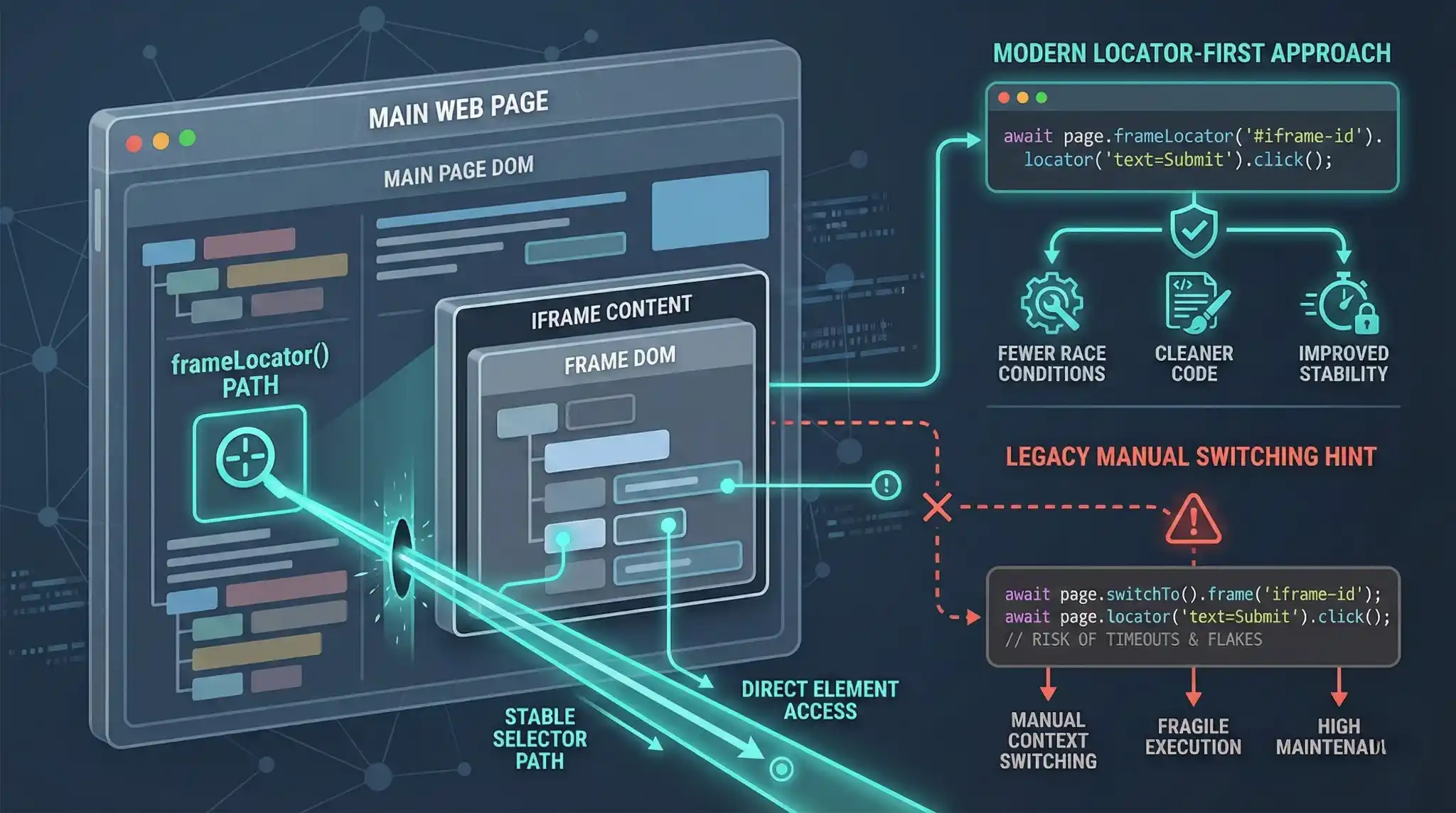
1) iFrames: stop switching, start “tunneling” with frameLocator()
You can use page.frame(…), but in most testing workflows, frameLocator() is simpler and safer. It gives you a clean “tunnel” into the frame while you keep using locators normally.
test('pay inside iframe using frameLocator', async ({ page }) => {

  await page.goto('https://your-app-url.com');

  const frame = page.frameLocator('iframe[data-testid="payment-frame"]');


  await expect(frame.getByLabel('Card Number')).toBeVisible();


  await frame.getByLabel('Card Number').fill('4111111111111111');

  await frame.getByLabel('Expiry Date').fill('12/30');

  await frame.getByRole('button', { name: 'Pay Now' }).click();


  await expect(page.getByText('Payment successful')).toBeVisible();

});
Why frameLocator() is a game changer
- No context switching: you don’t go “in/out” of frames manually.
- Locator-first mental model: the code reads like normal page automation.
- Works well for nesting: frames inside frames stay manageable.
Pro tip: Waiting for the iframe element isn’t always enough.
The most stable wait is a real UI signal inside the frame:
await expect(frame.getByLabel(‘Card Number’)).toBeVisible();
2) Uploads: bypass the OS dialog (two patterns you’ll actually use)
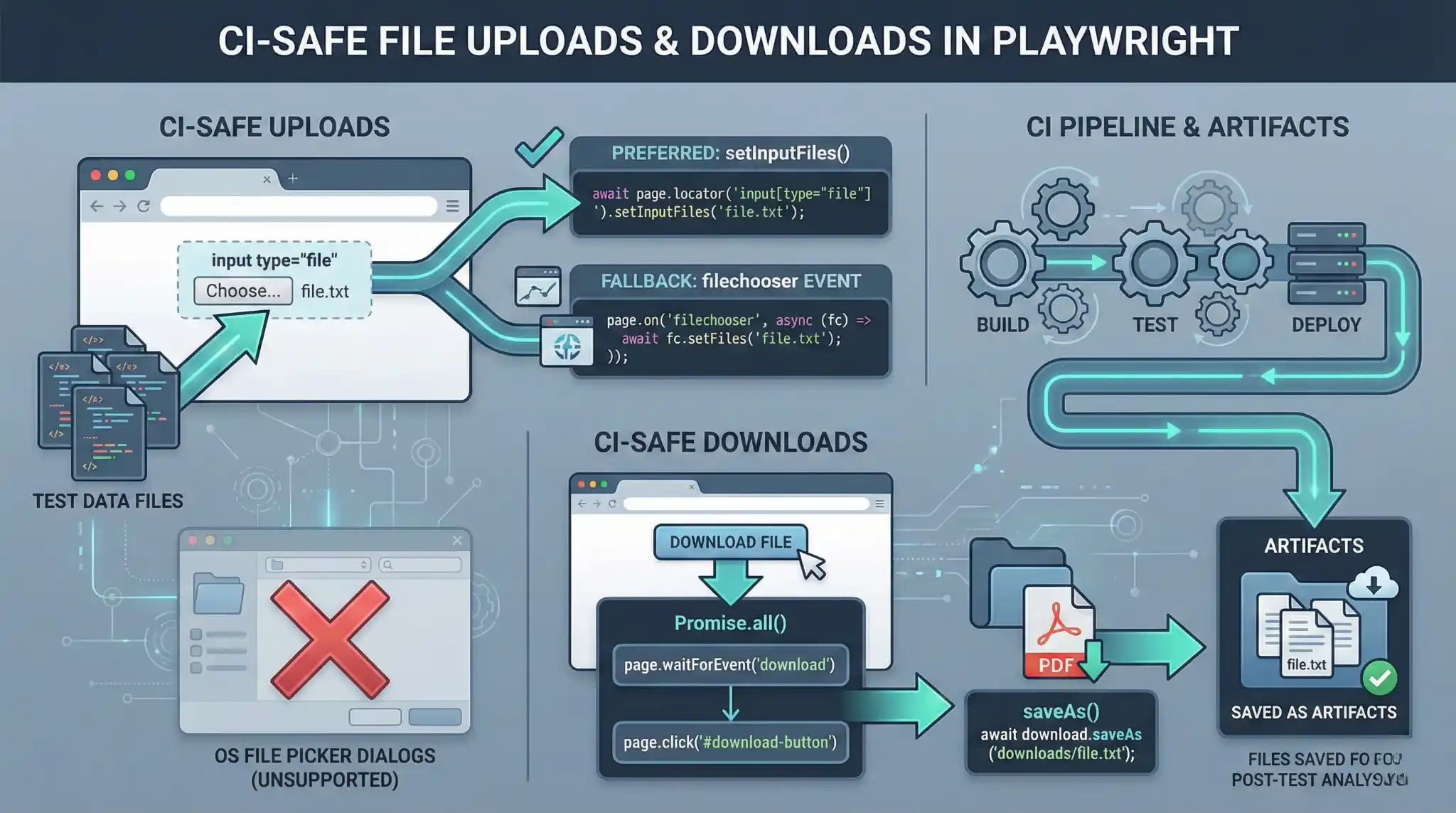
Playwright doesn’t deal with the OS file picker like a human does. It sets files at the DOM level.
Method A: setInputFiles() (best practice)
Most apps have an <input type=”file”>—even if it’s hidden and triggered by a fancy button. If you can locate the input, this is the cleanest approach.
test('upload resume with setInputFiles', async ({ page }) => {

  await page.goto('https://your-app-url.com');


  await page.getByTestId('resume-upload').setInputFiles('tests/data/resume.pdf');


  await page.getByRole('button', { name: 'Submit' }).click();

  await expect(page.getByTestId('toast-success')).toBeVisible();

});
Multiple files?
await page.getByTestId('attachments-upload').setInputFiles([

  'tests/data/file1.pdf',

  'tests/data/file2.png',

]);
Method B: filechooser event (when the input is created dynamically)
Some apps create the input only when you click “Upload”. In that case, listen for the chooser event before clicking.
test('upload using filechooser event', async ({ page }) => {

  await page.goto('https://your-app-url.com');

  const [fileChooser] = await Promise.all([

    page.waitForEvent('filechooser'),

    page.getByRole('button', { name: 'Upload' }).click(),

  ]);


  await fileChooser.setFiles('tests/data/resume.pdf');

  await expect(page.getByTestId('toast-success')).toBeVisible();

});
Practical rule: Try Method A first.
Use Method B only when you truly can’t access the input.
3) Downloads: catch the event and save the file (CI-safe)
In automation, we don’t click and then search a Downloads folder.
We intercept the download event and control where the file goes.
test('download report and save it reliably', async ({ page }) => {

  await page.goto('https://your-app-url.com');

  const [download] = await Promise.all([

    page.waitForEvent('download'),

    page.getByRole('button', { name: 'Export as PDF' }).click(),

  ]);

  const filename = download.suggestedFilename();


  // CI-friendly: persist the artifact

  await download.saveAs(`downloads/${filename}`);

  expect(filename).toContain('report');

});
Why saveAs() matters
- Downloads can be stored in temporary locations
- CI systems (Jenkins/GitHub Actions) need real artifacts for debugging
- saveAs() gives you an explicit file you can archive


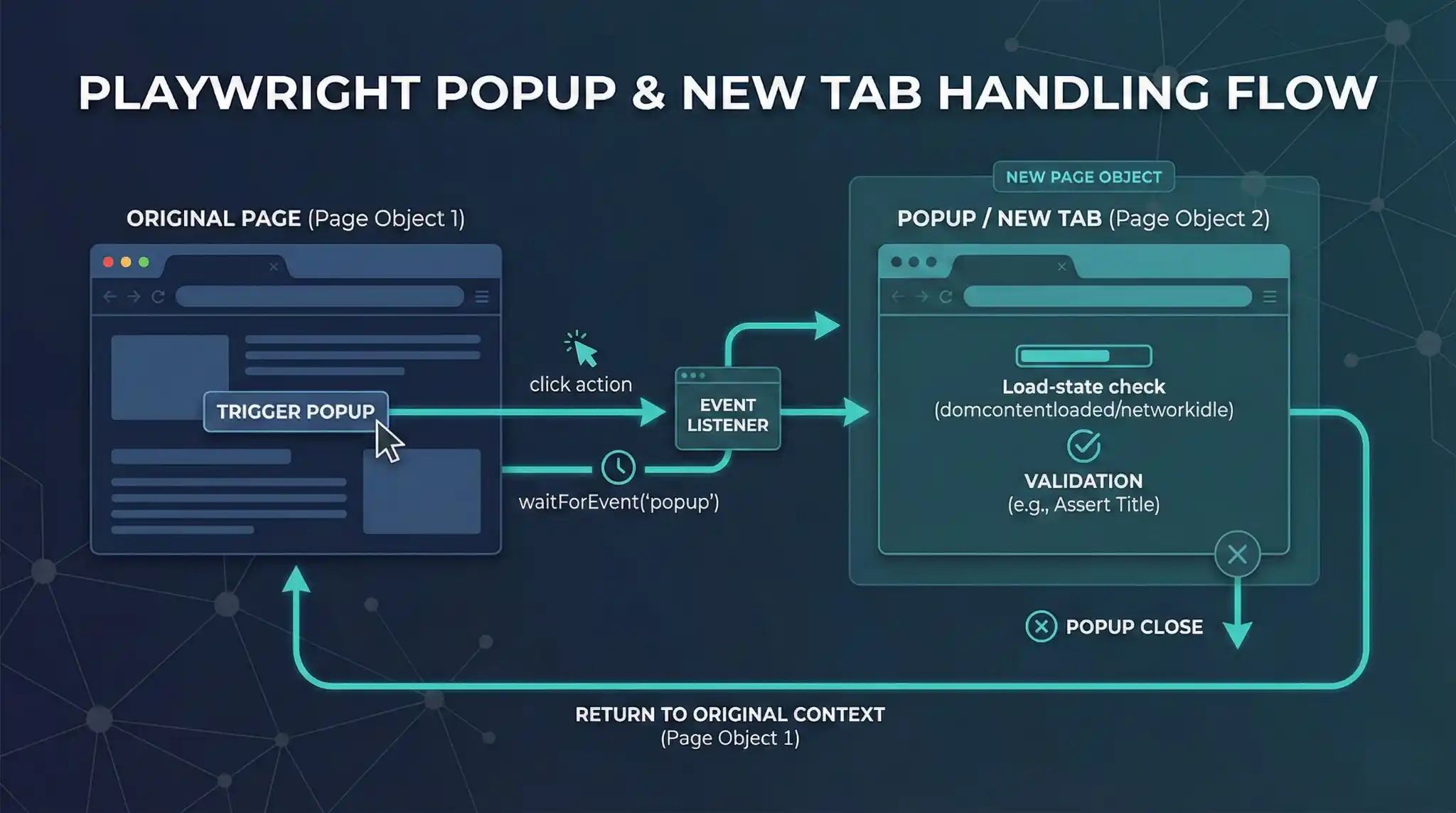
4) Popups: new tab = new Page (catch it intentionally)
When your app opens a new tab/window (SSO, Help Center, Preview), Playwright creates a new Page object.
The reliable approach is the same pattern again: listen + click together.
test('handle popup and validate content', async ({ page }) => {

  await page.goto('https://your-app-url.com');


  const [popup] = await Promise.all([

    page.waitForEvent('popup'),

    page.getByRole('link', { name: 'Open in new tab' }).click(),

  ]);


  await popup.waitForLoadState();


  await expect(popup).toHaveTitle(/Help Center/i);

  await popup.close();


  await expect(page.getByRole('heading', { name: 'Dashboard' })).toBeVisible();

});
Note: In rare cases where the tab is opened outside the immediate click chain, you can listen at the context level:
test('popup fallback using context page event', async ({ page, context }) => {

  const [newPage] = await Promise.all([

    context.waitForEvent('page'),

    page.getByRole('link', { name: 'Open in new tab' }).click(),

  ]);

  await expect(newPage).toHaveTitle(/Help Center/i);

});
5) Robust recipes (common patterns you’ll hit in the real world)
Pattern 1: “Cross-boundary” popup (iframe click → popup opens)
Example: payment iframe opens a bank/auth page in a new tab.

test('iframe button opens popup', async ({ page }) => {

  await page.goto('https://your-app-url.com');

  const frame = page.frameLocator('iframe[data-testid="payment-frame"]');

  const [popup] = await Promise.all([

    page.waitForEvent('popup'),

    frame.getByRole('button', { name: 'Pay with Bank' }).click(),

  ]);

  await popup.waitForLoadState();

  await expect(popup).toHaveURL(/bank-auth/i);

});
Pattern 2: Download verification (filename guardrail)
test('download csv - verify filename', async ({ page }) => {

  await page.goto('https://your-app-url.com');

  const [download] = await Promise.all([

    page.waitForEvent('download'),

    page.getByRole('button', { name: 'Get CSV' }).click(),

  ]);


  expect(download.suggestedFilename()).toMatch(/^monthly_report_\d{4}\.csv$/);

  await download.saveAs(`downloads/${download.suggestedFilename()}`);

});
Conclusion
Frames, uploads, downloads, and popups aren’t “edge cases”. They’re daily reality in modern web apps.
Playwright makes them predictable if you stick to a few rules:
- Use frameLocator() to work inside iFrames without stateful switching
- Prefer setInputFiles() on the file input; use filechooser only when required
- Use Promise.all() to set the event trap before you click
- Always saveAs() downloads so CI has real artifacts
When you apply these patterns consistently, your “complex UI” tests often become the most reliable ones.
If you want, I can also add a short “Troubleshooting Cheat Sheet” section (common failures → root cause → fix) to make this even more shareable on LinkedIn.
FAQs
1) Why do Playwright tests fail in iframes?
Because the UI is in a different context. Use frameLocator() to “tunnel” into the iframe and interact with elements normally.
2) What is the most stable way to automate iframe elements?
Use a real UI signal inside the frame (like a visible label or field) before interacting, not just waiting for the iframe tag.
3) How do I upload files in Playwright without OS dialogs?
Use setInputFiles() on the file input (even if it’s visually hidden). It’s the cleanest, most reliable approach.
4) When should I use the filechooser event instead of setInputFiles()?
Use filechooser only when the file input is created dynamically after clicking “Upload.” Listen for the event and click together using Promise.all().
5) What’s the safest pattern for downloads in Playwright (especially in CI)?
Trap the download event first using Promise.all(), then save the file explicitly using download.saveAs() so CI retains the artifact.
6) Why is saveAs() important for CI pipelines?
Downloads may land in temporary locations. saveAs() creates a real file you can archive in CI tools like Jenkins or GitHub Actions.
7) How do I handle popups/new tabs reliably in Playwright?
Treat the popup as a new Page. Use the “listen + click” pattern: wait for popup, click the link, then work on the new page.
8) What’s the single rule that makes context changes predictable in Playwright?
Set the event trap before the action: use Promise.all() to listen for popup, download, or filechooser and click in the same step.
We Also Provide Training In:
- Advanced Selenium Training
- Playwright Training
- Gen AI Training
- AWS Training
- REST API Training
- Full Stack Training
- Appium Training
- DevOps Training
- JMeter Performance Training
Author’s Bio:


Content Writer at Testleaf, specializing in SEO-driven content for test automation, software development, and cybersecurity. I turn complex technical topics into clear, engaging stories that educate, inspire, and drive digital transformation.
Ezhirkadhir Raja
Content Writer – Testleaf