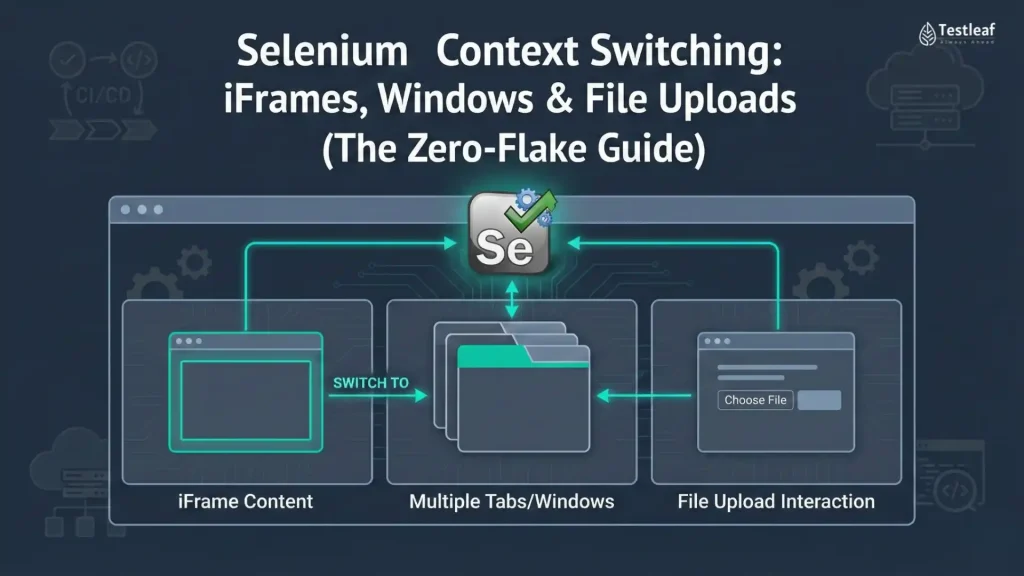
Modern web apps are rarely “one page, one DOM.”
They’re more like mini ecosystems that embed:
- iFrames (Stripe/PayPal forms, embedded widgets, chat)
- New tabs/windows (OAuth logins, help docs, external portals)
- Native file dialogs (OS-controlled pickers)
This is exactly where Selenium tests start to “randomly fail”—not because Selenium is broken, but because your test is looking in the wrong context.
If you’ve ever seen:
- NoSuchElementException even though the element is clearly visible
- tests that pass locally but fail in CI (Docker/Linux)
- uploads that work on your laptop and die on Grid
…this guide is for you.
Below are production-grade patterns to handle all three—reliably, consistently, and with far fewer flaky reruns.
You Might Also Like: Automation testing interview questions
1) iFrames — “Pages Inside Pages”
What’s actually happening
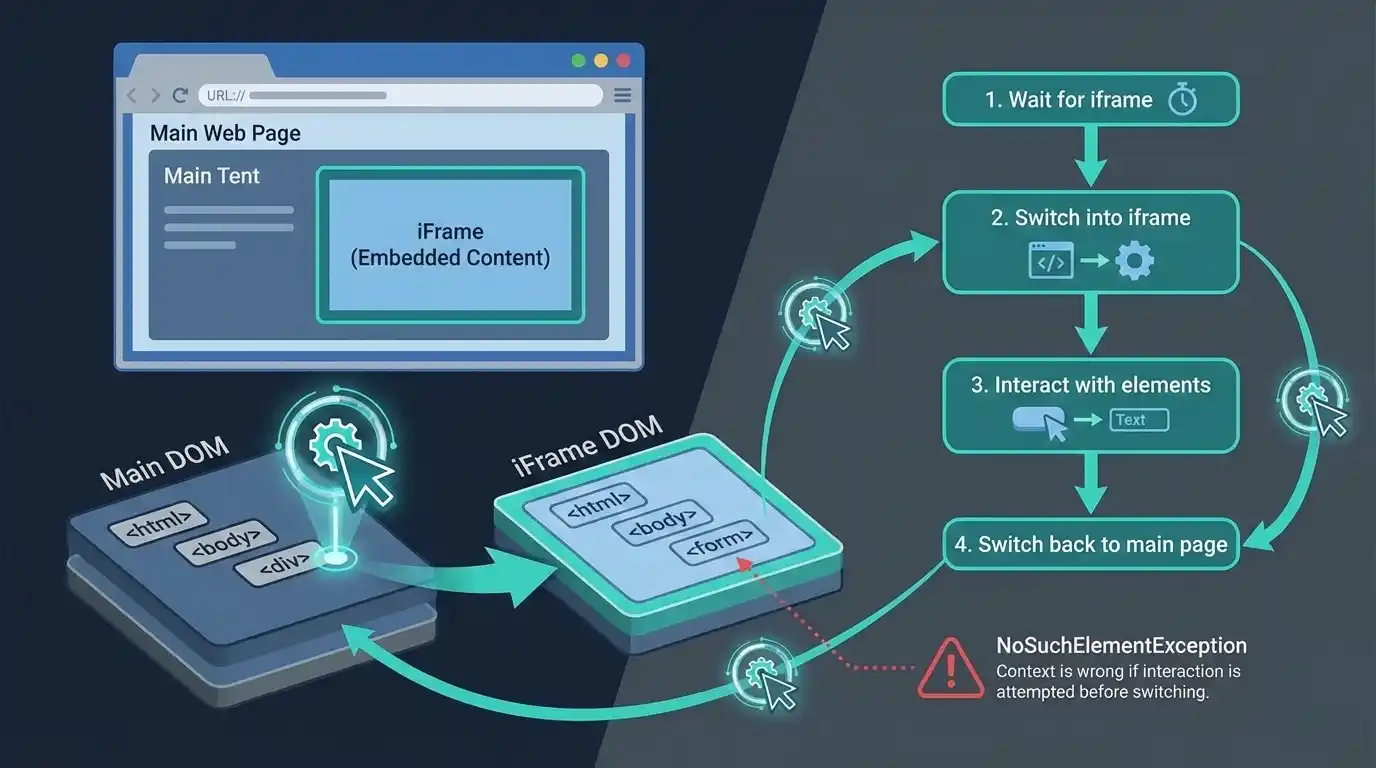
An iframe is a separate HTML document embedded inside your main page. Selenium can only “see” one DOM at a time.
So if your element lives inside an iframe, Selenium will throw NoSuchElementException until you switch focus to that iframe.
Medium/LinkedIn visual idea: A simple diagram showing a main DOM and an isolated iframe DOM, with the driver pointing to one at a time.
The senior pattern: Wait + Switch
The most common iframe flake is switching too early—before the iframe is fully available.
Instead of switching immediately, wait until the iframe is ready and switch in one go:
import org.openqa.selenium.By;

import org.openqa.selenium.support.ui.ExpectedConditions;

import org.openqa.selenium.support.ui.WebDriverWait;

import java.time.Duration;

By paymentFrame = By.cssSelector("iframe[data-testid='payment-frame']");

WebDriverWait wait = new WebDriverWait(driver, Duration.ofSeconds(15));

// Golden rule: wait until the frame is available, then switch

wait.until(ExpectedConditions.frameToBeAvailableAndSwitchToIt(paymentFrame));

// Now you're inside the iframe DOM

driver.findElement(By.id("cardNumber")).sendKeys("4111 1111 1111 1111");

Getting back out (crucial)
After iframe work, always return to the main page—or your next steps will “mysteriously” fail.
driver.switchTo().defaultContent(); // back to the top-level page

// or if you're inside nested frames:

driver.switchTo().parentFrame();    // back one level up
More Insights: epam interview questions
2) Window Handles — Tabs and Pop-ups
What’s actually happening
When your app opens a new tab/window, Selenium does not automatically switch. It stays focused on the original tab unless you tell it otherwise.
Visual idea: Two browser tabs open, but the “Driver Focus” arrow still pointing at the first tab.
The senior pattern: Wait for the second window
Don’t switch immediately after clicking. Wait until the new window exists.
import org.openqa.selenium.support.ui.WebDriverWait;

import java.time.Duration;

String originalWindow = driver.getWindowHandle();

driver.findElement(By.id("helpLink")).click();


WebDriverWait wait = new WebDriverWait(driver, Duration.ofSeconds(10));


// Wait until the new window appears

wait.until(d -> d.getWindowHandles().size() > 1);

// Switch to the new window

for (String handle : driver.getWindowHandles()) {

    if (!handle.equals(originalWindow)) {

        driver.switchTo().window(handle);

        break;

    }

}


// Optional: validate you landed in the right place

wait.until(d -> d.getCurrentUrl().contains("help"));


// Work in the new window

System.out.println("New Title: " + driver.getTitle());
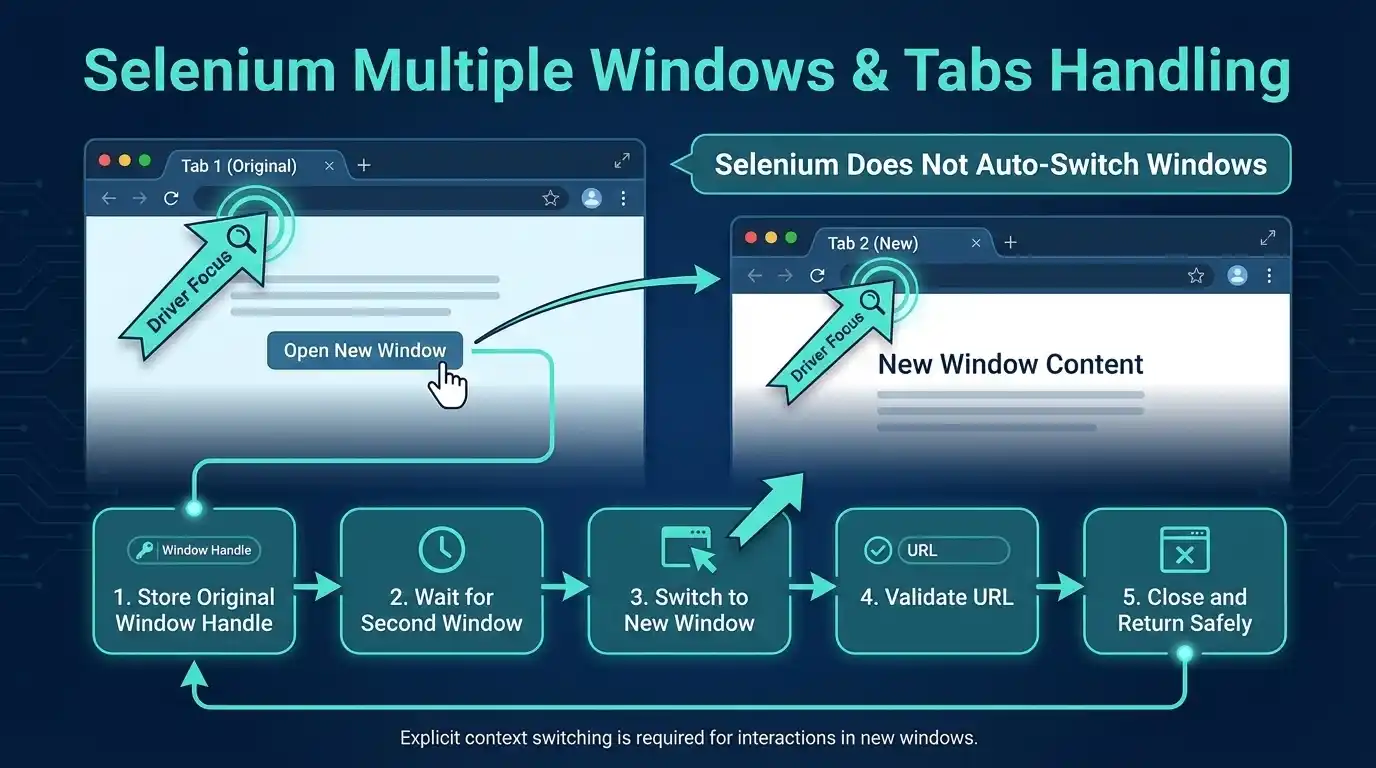
Clean return (avoid closing the wrong tab)
Popups sometimes auto-close or redirect. Make cleanup safe:
try {

    // actions in new window

} finally {

    // Close only if you're not on the original window

    if (!driver.getWindowHandle().equals(originalWindow)) {

        driver.close();

    }

    driver.switchTo().window(originalWindow);

}
Recommended for You: playwright interview questions
3) Native File Uploads — CI’s Most Common Failure
What’s actually happening
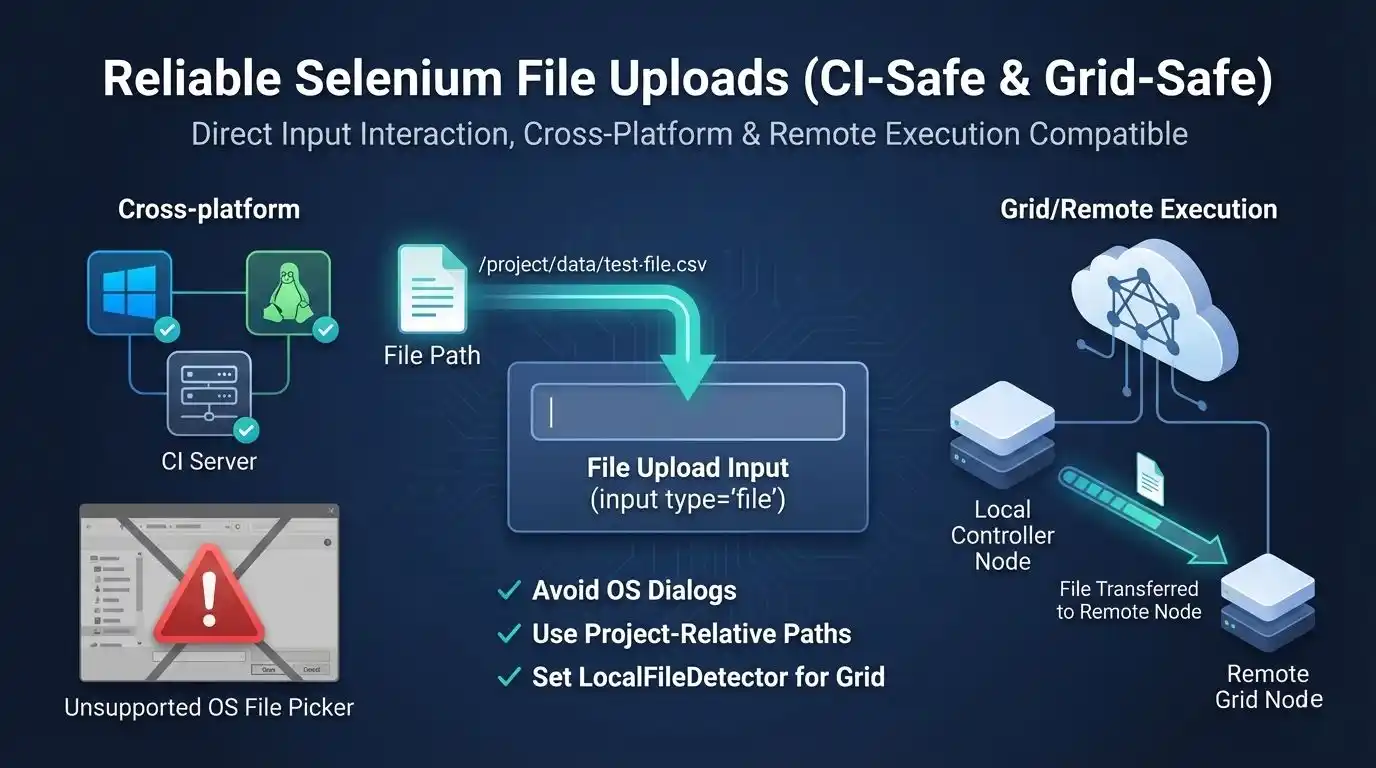
Selenium cannot control OS-level UI (Windows Explorer, macOS Finder).
So automation that tries to click “Upload” and drive the file picker is fragile and often breaks in CI.
The right approach: bypass the UI
Send the file path directly to the <input type=”file”>.
But here’s the catch:
- Hardcoded paths like C:\Users\Me\… break in Linux CI
- Remote execution (Grid/SauceLabs/BrowserStack) needs special handling
The production-grade pattern (CI-safe + Grid-safe)
import java.io.File;

import org.openqa.selenium.By;

import org.openqa.selenium.WebElement;

import org.openqa.selenium.remote.LocalFileDetector;

import org.openqa.selenium.remote.RemoteWebDriver;

WebElement fileInput = driver.findElement(By.cssSelector("input[type='file']"));

// Remote/Grid: upload from your machine to the remote node

if (driver instanceof RemoteWebDriver) {

    ((RemoteWebDriver) driver).setFileDetector(new LocalFileDetector());

}

// Use a project-relative path (works on Windows/Mac/Linux CI)

File uploadFile = new File("src/test/resources/test-data/profile.jpg");

// Send absolute path

fileInput.sendKeys(uploadFile.getAbsolutePath());
If sendKeys() fails (quick checklist)
Before jumping to hacks, check these common causes:
- The input is disabled
- The DOM re-rendered after clicking “Upload” → re-locate the element
- You selected a wrapper element instead of the real file input
- On Grid: LocalFileDetector wasn’t set before sendKeys()
Also, Know More About: AI and ML engineer salary in india
Handling hidden inputs (last resort)
Most modern UIs hide the <input> element. sendKeys() often still works.
If you hit ElementNotInteractableException, you can temporarily make it visible in test environments:
import org.openqa.selenium.JavascriptExecutor;

((JavascriptExecutor) driver)

  .executeScript("arguments[0].style.display='block';", fileInput);

fileInput.sendKeys(uploadFile.getAbsolutePath());


Troubleshooting Cheat Sheet
| Symptom | Probable Cause | Quick Fix |
| Element is visible but Selenium can’t find it | It’s inside an iframe | Use frameToBeAvailableAndSwitchToIt() |
| Test passes locally, fails on CI uploads | Hardcoded path / missing file | Use new File(relPath).getAbsolutePath() |
| Upload fails on Grid / remote | File never reaches remote node | Set LocalFileDetector |
| Script fails after closing popup | Focus never returned to main window | switchTo().window(originalHandle) |
| Random flakiness on switch | Switching too early | Add WebDriverWait for iframe/window |
Conclusion
Handling iFrames, popups, and uploads isn’t magic—it’s strict context control:
- iFrames: wait → switch → always switch back
- Windows: track handles → switch intentionally → return safely
- Uploads: never automate OS dialogs → use file input + CI-safe paths
Once these patterns are in your toolkit, a whole class of “mysterious Selenium failures” disappears—and your suite becomes something you can actually trust.
Working with newer tools? Playwright smooths a lot of this with built-in waiting and cleaner file upload APIs. But for the massive ecosystem of Selenium projects, these patterns are still the gold standard.
FAQs
1) What is “context switching” in Selenium?
Context switching is telling Selenium where to look—the main page DOM, an iframe DOM, or a different browser window/tab—so it can find and act on elements correctly.
2) Why do elements “exist” but Selenium throws NoSuchElementException?
Often the element is inside an iframe, and Selenium can only see one DOM at a time until you switch into that frame.
3) What’s the most reliable way to switch to an iframe?
Use a wait that switches only when the frame is ready: frameToBeAvailableAndSwitchToIt() to avoid switching too early.
4) After working inside an iframe, how do I return to the main page?
Switch back using driver.switchTo().defaultContent() (or parentFrame() for nested frames) before continuing.
5) Why doesn’t Selenium automatically switch to a new tab/window?
When a new window opens, Selenium stays focused on the original window unless you explicitly switch.
6) What’s the safest pattern to switch windows?
Store the original handle, wait until getWindowHandles().size() > 1, switch to the new handle, then return safely in a finally block.
7) Why do file uploads fail in CI even when they work locally?
Selenium can’t control OS file pickers, and hardcoded local paths (like C:\...) break on Linux CI.
8) What’s the best way to upload files in Selenium?
Bypass the file dialog and send the path directly to the real <input type="file"> using sendKeys() with an absolute path.
We Also Provide Training In:
- Advanced Selenium Training
- Playwright Training
- Gen AI Training
- AWS Training
- REST API Training
- Full Stack Training
- Appium Training
- DevOps Training
- JMeter Performance Training
Author’s Bio:


Content Writer at Testleaf, specializing in SEO-driven content for test automation, software development, and cybersecurity. I turn complex technical topics into clear, engaging stories that educate, inspire, and drive digital transformation.
Ezhirkadhir Raja
Content Writer – Testleaf