The StaleElementReferenceException is one of the most intriguing exceptions that you would have experienced in your selenium tests. Hope this post can help you resolve this exception from reoccurring in your tests.
A StaleElementReferenceException occurs when Selenium tries to use a WebElement that no longer matches the current DOM—usually because the page re-rendered, refreshed, or replaced the element after you located it. Fix it by re-finding elements just-in-time, waiting for stable states, and using a small retry only for stale failures—especially in CI.
Key Takeaways
-
Store locators (
By) and find elements only when needed. -
Wait for meaningful states (clickable/updated list), not time.
-
Add screenshots/logs and a small stale-only retry for CI stability.
Stale element issues show up more in CI and cloud grids because timing differs by region (network latency, slower runners, different browser/viewport defaults). If your users are in India or global regions, UI can also re-render due to cookie banners, locale selectors, and A/B experiments—so rely on stable waits + re-locate patterns instead of sleeps.
What is StaleElementReferenceException?
Per Selenium Webdriver documentation, the reference to an element is now “stale” — the element no longer appears on the DOM of the page. Simply put, the element you located using the findElement method disappeared when you started interacting with it.
Let us understand some insights about how Selenium WebDriver handles this scenario:
WebDriver Internals
When you write the syntax to perform an action using Selenium WebDriver; it internally calls the WebDriver API associated with that method.

Way of Working — Selenium WebDriver
WebDriver Method
For example, if you like to look up an element in the browser using Selenium WebDriver in Java, the syntax looks following:
 Locate an Element using Id as Selector
API Request
Now, the java method internally calls the WebDriver API — the post request through passing the locator information in the body like below:
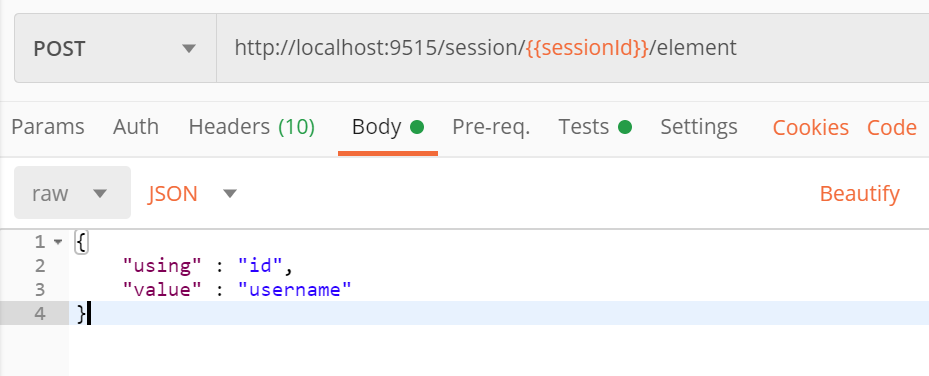 FindElement request posted through PostMan
In the above request, localhost points to chrome driver running as a local server in port 9515.
Note: When running your tests from your IDE like eclipse, Selenium finds the free port at runtime and that may not be the 9515, which is the default port.
API Response
The API response from the chrome driver server on a successful match will return the WebElement, and the response will be like the below: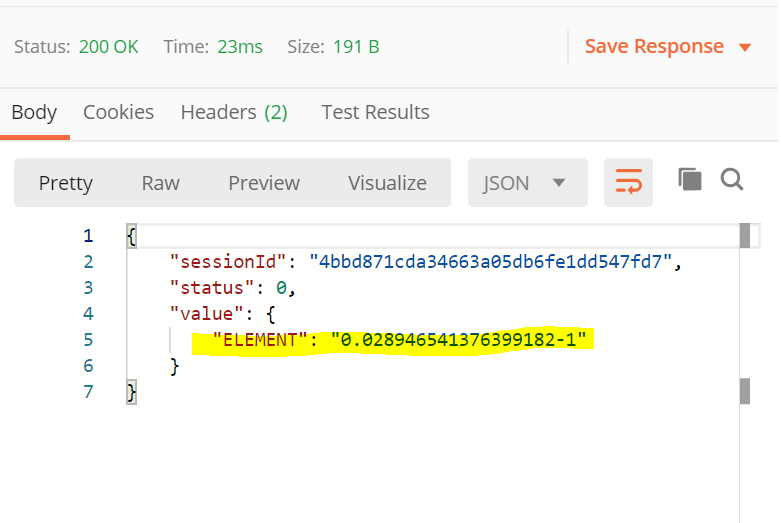 Response with Element Information
Here, you will find the element information with a unique identifier for every session for that requested DOM. Note: The element information will differ when the page is reloaded or navigated from different sessions.
Learn more about software testing courses from Testleaf
FAQs
What causes stale element reference exception in Selenium?
How do I fix stale element reference exception?
Why does stale element happen more in CI than locally?
Should I use Thread.sleep() to avoid stale element?
Can Page Object Model cause stale elements?
How do I debug stale element errors faster?
We Also Provide Training In:
- Advanced Selenium Training
- Playwright Training
- Gen AI Training
- AWS Training
- REST API Training
- Full Stack Training
- Appium Training
- DevOps Training
- JMeter Performance Training
Author’s Bio:

As CEO of TestLeaf, I’m dedicated to transforming software testing by empowering individuals with real-world skills and advanced technology. With 24+ years in software engineering, I lead our mission to shape local talent into global software professionals. Join us in redefining the future of test engineering and making a lasting impact in the tech world.
Babu Manickam
CEO – Testleaf