Learn how to build reliable Playwright automation tests in 2026 using the Zero-Flake strategy. This guide covers stable setup, locator best practices, CI reliability, first test implementation using the Leaftaps OpenTaps demo site, and scalable Playwright framework design.
Introduction: Why Reliable UI Automation Matters in 2026
Choosing a UI automation tool is no longer the biggest challenge for testing teams. The real challenge is building automation that produces consistent, trustworthy results.
Flaky UI tests:
- Waste engineering effort
- Reduce confidence in automation
- Increase debugging time
- Encourage manual validation fallback
Modern automation success depends on designing reliability into your test strategy from the beginning. Playwright has emerged as a leading browser automation framework because it provides strong isolation, parallel execution, and built-in debugging capabilities. However, tool capabilities alone do not eliminate instability. Stability must be intentionally engineered.
This guide explains how to adopt Playwright using a Zero-Flake Setup Strategy, ensuring automation remains reliable as applications, teams, and CI pipelines scale.
What is Playwright Automation Testing?
Playwright is a modern browser automation framework that enables testers and developers to create end-to-end UI tests across Chromium, Firefox, and WebKit browsers using a single API.
Playwright automation allows teams to simulate real user actions including:
- Page navigation
- Form submission
- Authentication flows
- File uploads and downloads
- UI validation
- Network validation
The primary advantage of Playwright is its ability to combine automation execution with built-in debugging artifacts such as traces, screenshots, and videos. These capabilities help teams identify root causes of failures quickly.
Other Helpful Articles: playwright interview questions
The Zero-Flake Contract: The Foundation of Reliable Automation
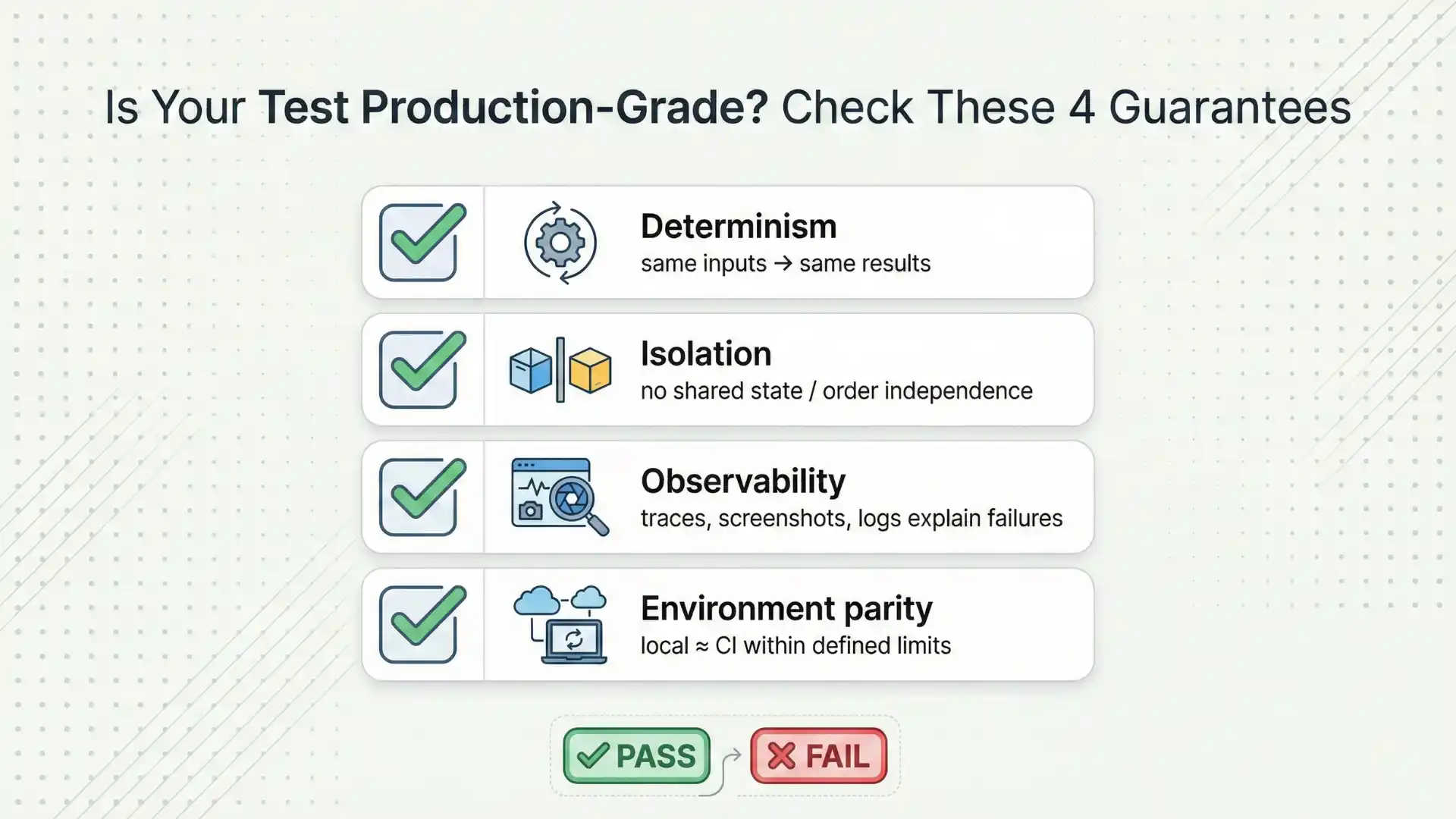
To build stable UI automation, tests must follow four reliability guarantees.
- Determinism
Tests should always produce the same output when executed with the same input and environment conditions.
Tests must run independently without relying on shared state or execution order.
- Observability
Every failure should produce sufficient debugging evidence such as traces, screenshots, and execution logs.
- Environment Parity
Test behavior should remain consistent between local execution and CI environments.
Automation suites that do not follow these guarantees eventually become unreliable regardless of the testing framework used.

Zero-Flake Setup: Building a Stable Playwright Foundation
The objective of Playwright setup is not simply executing tests successfully on a developer machine. The objective is ensuring tests execute consistently across all environments.
Baseline Setup Guidelines
- Maintain centralized Playwright configuration shared across teams.
- Enable retries primarily in CI environments.
- Generate debugging artifacts automatically during failures.
- Use isolated browser contexts for each test execution.
- Maintain environment consistency across local and CI execution.
Playwright provides a recommended tracing configuration:
trace: ‘on-first-retry’
This configuration captures execution traces only when retries occur, providing debugging visibility without excessive storage consumption.
Your First Playwright Test: Start Simple and Stable
New automation projects often attempt to automate complex user workflows immediately. This increases test fragility and debugging complexity.
The first Playwright test should validate:
- Playwright test runner configuration
- Browser launch and interaction
- Artifact generation
- Stable locator usage
Playwright Code Example Using Leaftaps Application
The following example validates the login functionality of the Leaftaps application hosted at:
import { test, expect } from '@playwright/test';

test('Leaftaps Login Validation', async ({ page }) => {

await page.goto('http://leaftaps.com/opentaps');

await page.fill('#username', 'Demosalesmanager');
await page.fill('#password', 'crmsfa');

await page.click('.decorativeSubmit');

await expect(page).toHaveURL(/.*control\/main/);
});
This example demonstrates a stable automation pattern:
- Validates a clear user intent (login functionality)
- Uses reliable element selectors
- Asserts successful navigation after authentication
- Helps confirm that the automation pipeline is functioning correctly
Locator Strategy: The Key to Reducing Test Flakiness
Locator selection directly impacts automation reliability.
Preferred Locator Approach
- Role-based selectors
- Label-based selectors
- User-visible text selectors
Locators to Avoid
- Deep nested CSS selectors
- Dynamic class-based locators
- DOM-structure-dependent selectors
Tests should validate application behavior from a user perspective rather than relying on internal UI structure.
Don’t Miss Out: Automation testing interview questions
Writing Stable Playwright Test Scripts
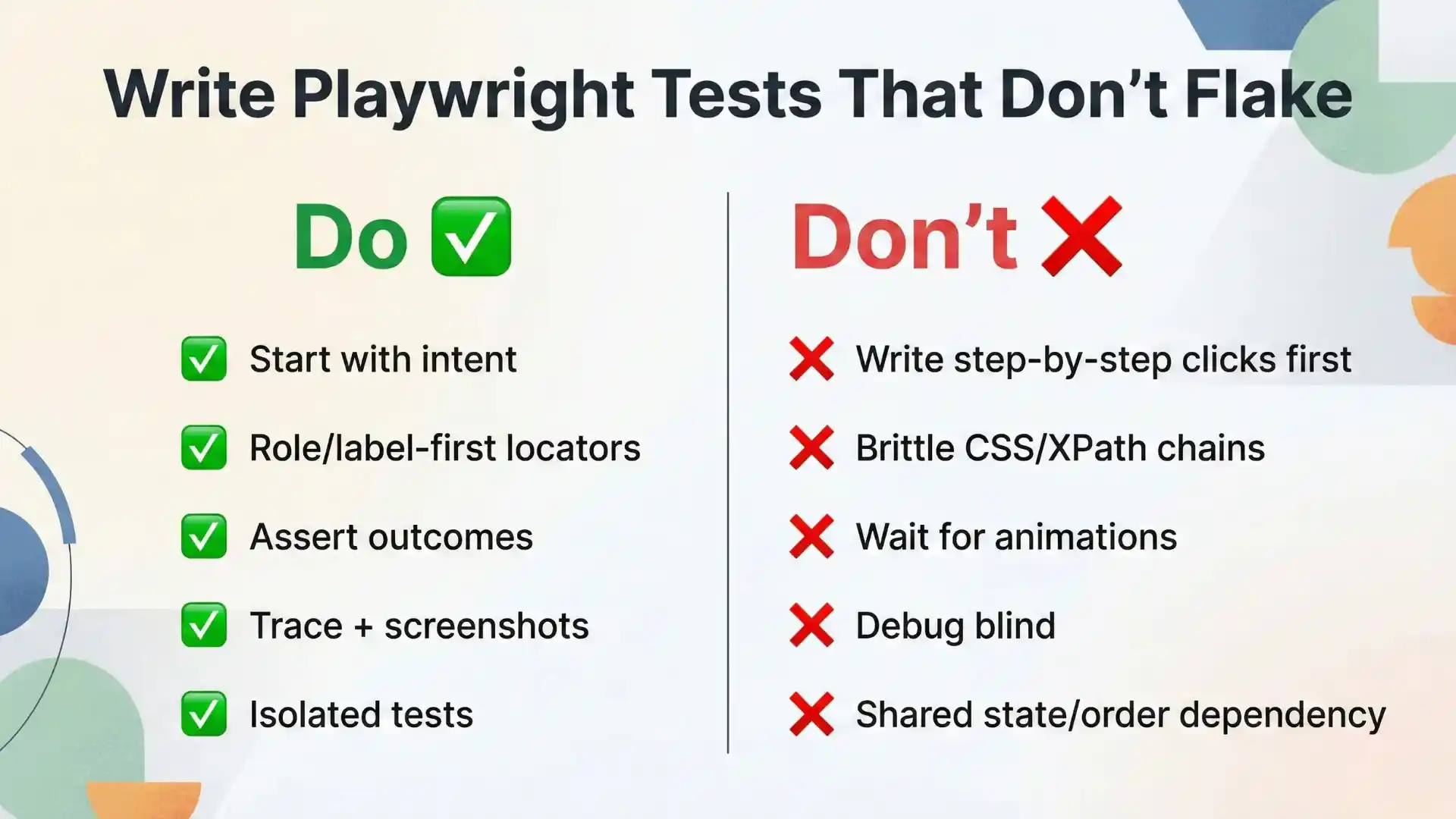
Reliable Playwright scripts follow structured design patterns.
Start with User Intent
Define business behavior validation instead of step-by-step UI interactions.
Use Resilient Locators
Prioritize accessibility-based selectors wherever possible.
Validate Final Outcomes
Assert meaningful application states instead of intermediate UI animations.
Generate Debugging Evidence
Always enable trace, screenshot, and report generation for failure diagnosis.
Ensure Test Isolation
Avoid sharing authentication or session data unless explicitly designed.
Building a Maintainable Playwright Framework
A scalable automation framework focuses on consistency rather than unnecessary abstraction.
Recommended Framework Structure
tests/ → User behavior driven test scenarios
pages/ → Reusable page interaction components
fixtures/ → Test data preparation and environment setup
utils/ → Common reusable utilities
Automation stability improves when teams invest in:
- Reliable test data creation
- Consistent environment management
- Independent test execution
CI Checklist for Playwright Automation Stability
Continuous Integration pipelines must clearly answer two critical questions:
Did the test fail?
Why did the test fail?
Required CI Artifacts
- HTML test execution report
- Trace file for failure analysis
- Screenshot or video capture during failure
Tracing during retry provides effective debugging insight while controlling resource usage.
Managing Retries and Flaky Tests
Retries should be used as a mitigation strategy rather than a permanent solution.
Teams should:
- Monitor retry frequency
- Identify unstable tests early
- Establish policies for isolating flaky test cases
- Track automation reliability metrics over time
Ignoring recurring test instability gradually reduces automation trust.
Understanding Playwright Architecture for Better Debugging
Understanding Playwright internals helps engineers diagnose failures systematically.
Playwright Execution Layers
- Test runner orchestrates execution
- Browser instance launches testing environment
- Browser context provides isolation per test
- Page object represents user interaction interface
- Artifacts capture failure debugging evidence
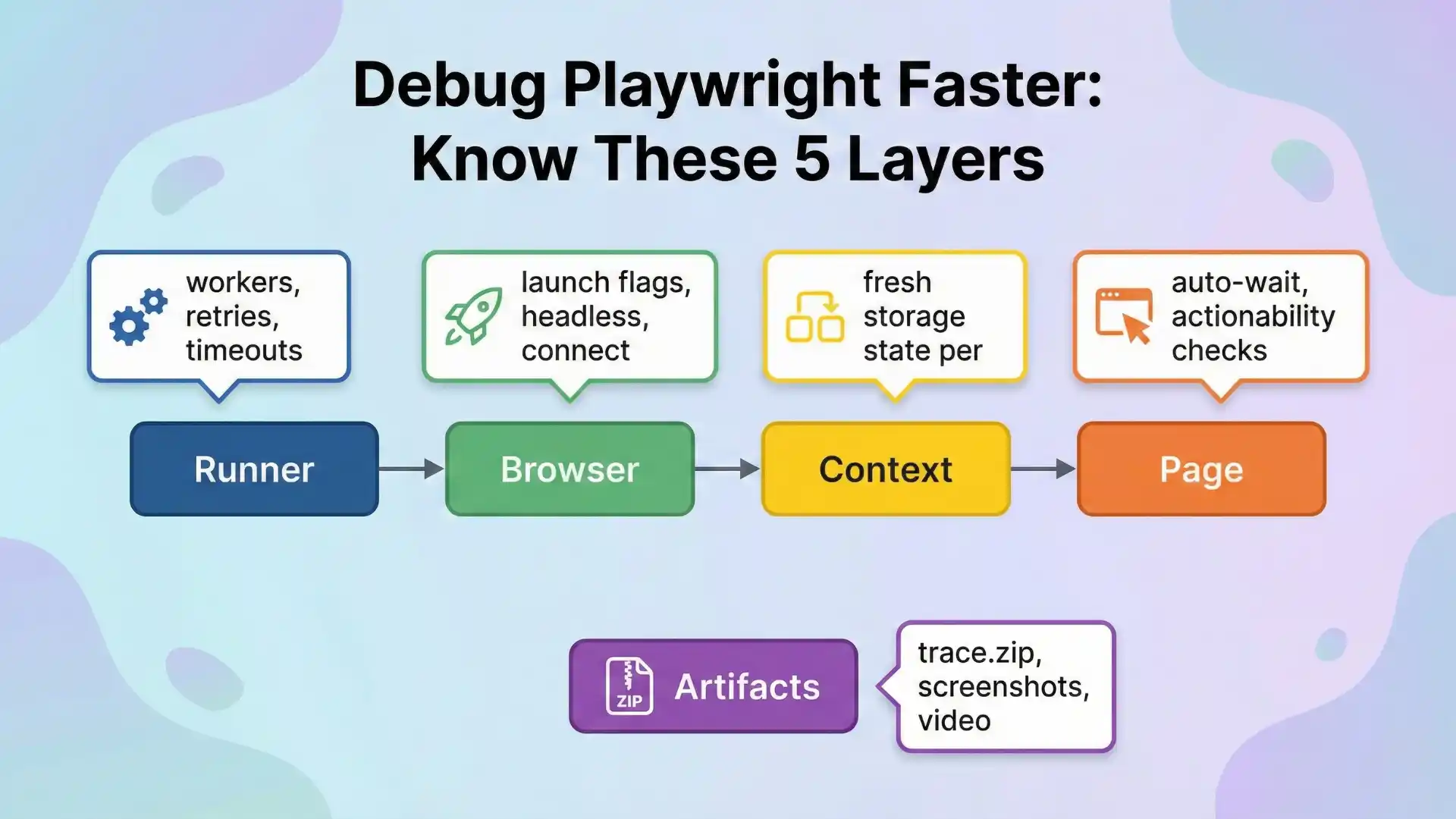
Understanding these layers transforms debugging from guesswork into structured problem solving.
Common Playwright Testing Patterns That Scale
Reliable automation teams typically implement three core testing patterns:
Smoke Tests
Fast execution tests that provide quick validation signals.
Business Rule Validation Tests
Tests verifying functional logic and workflow correctness.
Authenticated Workflow Tests
Tests using stored authentication state or API-based login techniques to avoid unstable UI login repetition.
You Might Also Like: AI and ML engineer salary in india
Where to Learn Playwright Features Effectively
For configuration clarity and advanced feature usage, refer to official Playwright documentation. Following official documentation ensures implementation consistency and reduces unsupported configurations.
Conclusion
Playwright provides powerful capabilities for modern UI automation, but tool selection alone does not eliminate flaky tests. Automation reliability depends on adopting disciplined testing strategies.
The Zero-Flake approach ensures scalable automation through:
- Deterministic test design
- Strong isolation practices
- Observable failure artifacts
- CI environment consistency
Flaky tests remain a common industry challenge. Teams that succeed in automation are those that design reliability intentionally instead of expecting frameworks to eliminate instability automatically.
Organizations planning UI automation initiatives in 2026 should prioritize automation trust, observability, and consistency. Once reliability is achieved, automation coverage and speed naturally improve.
If you want a structured path to build these skills end-to-end, consider a Playwright course online that teaches not just syntax, but stability and CI habits.
Worried about your testing career in 2026?
Explore the Testleaf Playwright Masterclass to learn modern UI automation the way real teams run it—stable, debuggable, and ready for CI.
FAQs
1) What is Playwright automation testing?
It’s using Playwright to simulate real user behavior (navigation, clicks, typing, uploads/downloads) and validate outcomes with stable assertions—built for modern CI realities like parallel runs and debuggable artifacts.
2) Is Playwright better than Selenium?
Playwright shines when you need reliable CI signals fast: strong isolation primitives, parallel execution, and first-class debugging artifacts. The real win is adopting a reliability baseline, not switching tools alone.
3) What makes Playwright tests less flaky?
Design for determinism, isolation, and observability—then enforce it through team config and CI artifacts. Flakiness drops when failures produce evidence you can replay instead of guess.
4) What is the best locator strategy in Playwright?
Prefer user-facing locators (role, label, accessible name) over brittle selectors. Anchor tests to semantics and intent, not DOM coincidences.
5) How do I set up Playwright for CI/CD properly?
Use deliberate retries in CI (not locally), always collect evidence (trace/report/screenshot/video), and keep tests isolated by default. This makes pipeline failures explainable and consistent across machines.
6) What should my CI checklist include for Playwright?
At minimum: an HTML report, a trace artifact (trace.zip), and screenshots/video on failure where useful—so every red build answers “what failed” and “why.”
7) What tracing setting is recommended for Playwright in CI?
A practical default is tracing on first retry (trace: 'on-first-retry') so you get replayable evidence when a test flakes—without bloating artifact storage on every run.
We Also Provide Training In:
- Advanced Selenium Training
- Playwright Training
- Gen AI Training
- AWS Training
- REST API Training
- Full Stack Training
- Appium Training
- DevOps Training
- JMeter Performance Training
Author’s Bio:


Content Writer at Testleaf, specializing in SEO-driven content for test automation, software development, and cybersecurity. I turn complex technical topics into clear, engaging stories that educate, inspire, and drive digital transformation.
Ezhirkadhir Raja
Content Writer – Testleaf