Even with Playwright’s excellent storageState support and carefully designed login flows, UI tests still fail.
And most of the time, it’s not because the feature is broken.
It’s because the session is.
You’ve probably seen it:
- A token expires 5 seconds before the test finishes
- auth.json works for one worker but not another
- The test expects /dashboard but gets bounced to /login
- A user role suddenly loses access to an API route
The result?
A red CI build and a familiar 30-minute ritual:
open the trace → replay the test → dig through logs → guess why the user was logged out.
What if your test framework could diagnose itself?
Other Recommended Reads: playwright interview questions
The Real Problem: Sessions Are Fragile
Session preservation is supposed to make UI tests faster and more stable.
In Playwright, we usually rely on:
- storageState (auth.json) to persist cookies and local storage
- globalSetup to log in once per CI run
It works… until it doesn’t.
Tokens expire.
Parallel workers invalidate shared state.
Permissions change.
When this happens, Playwright doesn’t say “you were logged out”.
It says something like:
TimeoutError: Element not found
The real root cause—authentication failure—is completely hidden.
From “What Failed” to “Why It Failed”
Traditional test reports tell you what happened.
AI can tell you why.
Instead of dumping raw logs and traces on engineers, we can add an AI triage layer that classifies failures into meaningful categories:
- Auth / Session Issue
Redirects to login, 401/403 responses - Locator Issue
Selector changed, strict mode violation - Application Bug
500 errors, broken business logic
Example AI Summary
“Test failed at Step 4. User was redirected from /orders to /login after a 401 response from the API. Classification: Session Expired.”
That’s the difference between guessing and knowing.
Feeding the Right Signals to AI
One critical rule:
Do not send full Playwright traces to an LLM.
They’re large, noisy, slow, and expensive.
Instead, extract high-signal metadata when a test fails:
- Final URL
- Page title
- Recent 401/403 network responses
- Console errors
Example: Capturing Failure Context (TypeScript)
interface FailureContext {

  finalUrl: string;

  pageTitle: string;

  lastNetworkErrors: { url: string; status: number }[];

  consoleErrors: string[];

}

export async function captureFailureContext(page: Page): Promise<FailureContext> {

  const authErrors = responses

    .filter(r => r.status() === 401 || r.status() === 403)

    .map(r => ({ url: r.url(), status: r.status() }));

  return {

    finalUrl: page.url(),

    pageTitle: await page.title(),

    lastNetworkErrors: authErrors.slice(-3),

    consoleErrors: []

  };

}
This small JSON payload is enough for an AI model to make a high-confidence diagnosis—without blowing token limits.
Continue Reading: manual testing interview questions
From Diagnosis to Self-Healing
This is where things get interesting.
If the AI confidently classifies a failure as a session issue, the framework can move from observation to action.
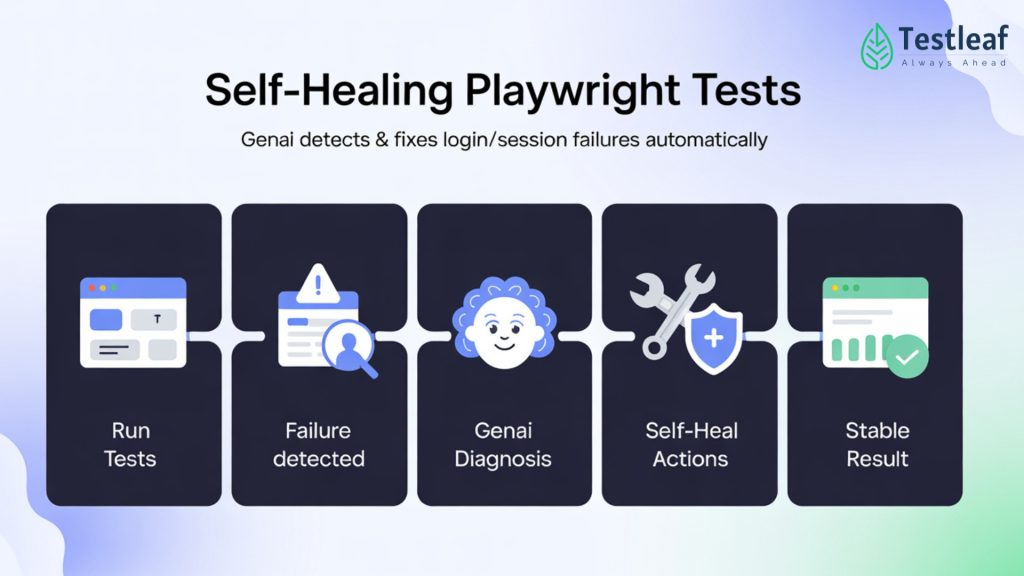
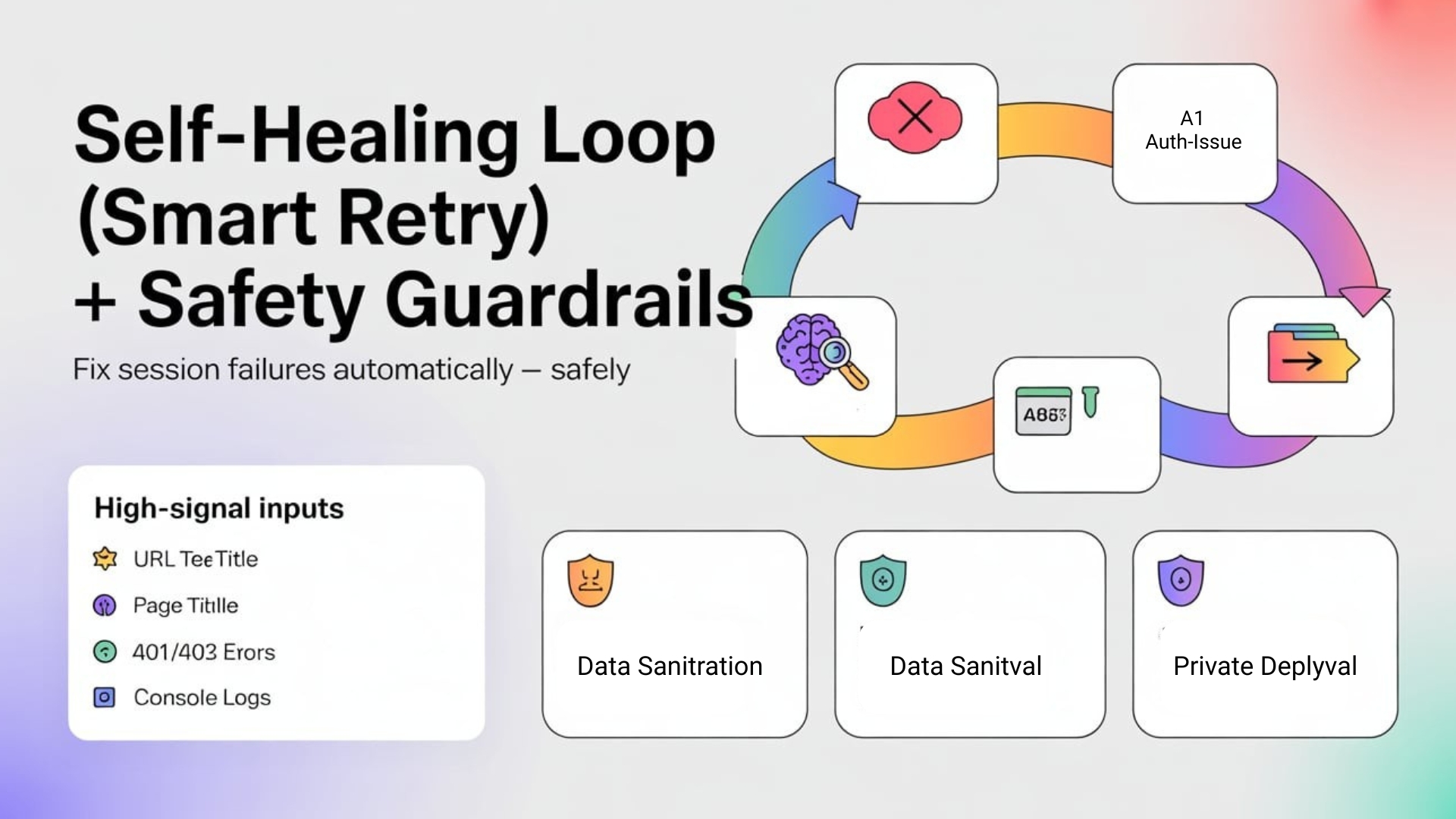
The Self-Healing Flow
- Test fails
- AI analyzes failure context
- AI returns: { category: “AUTH_ISSUE”, confidence: 0.95 }
- Framework refreshes auth.json
- Test is retried once with a fresh session
Pseudo-Code Example
if (testResult.status === 'failed') {

  const analysis = await aiAgent.analyze(failureContext);

  if (analysis.category === 'AUTH_ISSUE') {

    console.log('🤖 Session expired. Regenerating auth state...');

    await globalSetup();

    console.log('🔄 Retrying test with fresh session...');

  }

}
The goal isn’t infinite retries.
It’s intelligent retries, backed by evidence.
More Insights: Automation testing interview questions
Security Is Non-Negotiable
Any time AI touches authentication, guardrails matter.
- Sanitize everything
Never send raw tokens, passwords, or PII to an external LLM. - Human-in-the-loop
AI can suggest actions—but shouldn’t modify permissions or data. - Private models for regulated apps
Banking, healthcare, and enterprise systems should use private or self-hosted models.
Self-healing should reduce noise—not hide real problems.

You Can Start Without AI
You don’t need GenAI on day one.
Simple rules already catch many auth failures:
- Final URL ends with /login
- Network response is 401 or 403
- API calls suddenly fail after navigation
Once those rules are in place, GenAI helps with the fuzzy cases that don’t fit clean patterns.
Final Thoughts
Authentication issues are the silent killer of reliable UI test suites.
Playwright gives us great tools to manage state.
AI gives us the intelligence to understand when that state breaks.
By building a pipeline that:
- Detects session failures
- Explains the root cause
- Repairs state when it’s safe
you turn flaky tests into trustworthy signals.
You still design the login strategy.
AI just becomes the 24/7 analyst that keeps it running.
If you want to implement this in your own suite, start small: add a lightweight “failure context” capture (final URL, page title, last 401/403), classify obvious auth redirects first, and only then introduce GenAI for smarter root-cause suggestions—always with sanitization and clear logging so nothing “heals” silently. And if you’re looking for a playwright course online that goes beyond basics into CI-ready reliability patterns like this, join our Playwright webinar “Worried about your testing career in 2026?” to see these workflows in action and learn what modern teams expect.
FAQs
1) Why do Playwright tests fail even with storageState?
Because sessions are fragile—tokens expire, parallel workers can invalidate shared state, and permissions can change, causing redirects back to /login.
2) What’s the most common hidden root cause behind “Element not found”?
Authentication failures. The test can be logged out, but Playwright may surface it as a UI error like TimeoutError: Element not found, hiding the real cause.
3) What failure categories should I use for fast triage?
Use meaningful buckets like Auth/Session Issue, Locator Issue, and Application Bug so teams stop guessing and start fixing the right thing.
4) What signals help AI detect session issues quickly?
High-signal metadata like final URL, page title, recent 401/403 responses, and console errors.
5) Should I send full Playwright traces to an LLM?
No—don’t send full traces. They’re large, noisy, slow, and expensive. Extract only the useful signals instead.
6) What is a “failure context” in this approach?
A small JSON-style payload (example fields: finalUrl, pageTitle, last 401/403 network errors, console errors) that’s enough for high-confidence diagnosis.
We Also Provide Training In:
- Advanced Selenium Training
- Playwright Training
- Gen AI Training
- AWS Training
- REST API Training
- Full Stack Training
- Appium Training
- DevOps Training
- JMeter Performance Training
Author’s Bio:

Content Writer at Testleaf, specializing in SEO-driven content for test automation, software development, and cybersecurity. I turn complex technical topics into clear, engaging stories that educate, inspire, and drive digital transformation.
Ezhirkadhir Raja
Content Writer – Testleaf