As a QA engineer, I’ve faced countless situations where our UI tests failed—not because our application was broken, but because a third-party service we relied on was unstable. Debit card validation failing, balance amounts not updating, or identity verification APIs timing out—these external dependencies often turned our test suites into a minefield of false failures.
For a while, we treated these failures like normal bugs: log the defect, assign it to the third-party owner, and wait. But this approach was painful. Every test cycle was full of noise, hiding the real issues among false positives. It slowed down releases, frustrated developers, and eroded confidence in our automation. Something had to change.
That “something” was API integration within our UI tests, and the results were transformational.
The Problem with Relying Solely on UI Tests
UI tests are powerful—they simulate real user interactions and verify end-to-end functionality. But when you depend on third-party systems, UI tests have inherent limitations:
1. Flaky Tests
Even a minor delay in a third-party service could cause UI tests to fail. You’d see a red build for a failure that wasn’t your fault, wasting time investigating.
2. Limited Control
We couldn’t control or mock third-party services easily. Their outages or slowdowns were outside our influence, leaving us blind to real versus environmental failures.
3. Slow Debugging
Without network-level insights, developers struggled to reproduce issues. Screenshots alone weren’t enough; the actual API responses causing the failures were missing.
4. Poor Test Reliability
False failures undermined confidence in automation. Stakeholders started questioning whether test results were trustworthy, which defeats the very purpose of automation.
More Insights: Epam interview questions
Why API Integration Was the Answer
We realized that the key to reliable UI testing was visibility and control over third-party interactions. By integrating APIs into our test framework, we could:
- Validate third-party services directly before running UI tests
- Simulate or bypass failures in non-critical flows
- Capture network-level logs for debugging without relying solely on UI evidence
This approach allowed us to separate real application issues from external failures, drastically improving test reliability.

How We Implemented API Integration
The implementation was systematic and required collaboration between QA, development, and sometimes the third-party teams:
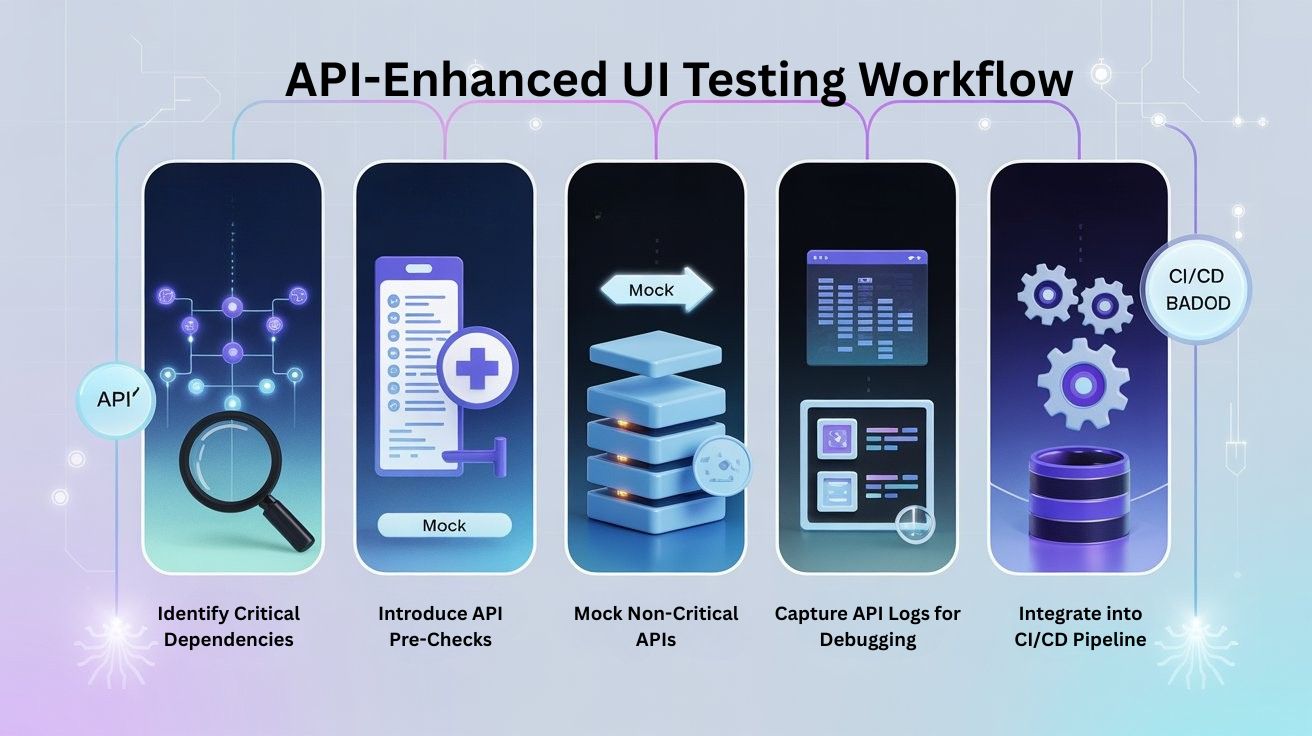
Step 1: Identify Critical Dependencies
We first mapped all third-party interactions in our application. For example:
- Debit card validation API
- Balance inquiry service
- Identity verification APIs
- Payment gateways
Each dependency was evaluated based on its impact on UI tests and release cycles.
Step 2: Introduce API Pre-Checks
Before running a UI test, we added API health checks:
- Hit the third-party API directly to confirm availability
- Validate the response for correctness and expected data
- Log any anomalies
If an API failed or returned inconsistent data, the test either skipped affected steps or recorded a soft failure, ensuring that only real application defects were reported.
Step 3: Mocking Non-Critical APIs
For non-essential flows, we implemented mock APIs or used sandbox environments. This allowed UI tests to continue running even if the live third-party service was unstable, reducing test suite flakiness.
Step 4: Capture API Logs for Debugging
We enhanced our test evidence by capturing HAR files and API responses alongside screenshots. When a failure occurred, developers could see the exact request/response that triggered it, making reproduction fast and precise.
Step 5: Integrate into CI/CD
Finally, API validation was integrated into the CI/CD pipeline. Tests would first validate third-party APIs, then execute UI flows conditionally. This ensured that pipeline failures reflected real issues, not external outages.
The Benefits We Experienced
The results were immediate and impressive:
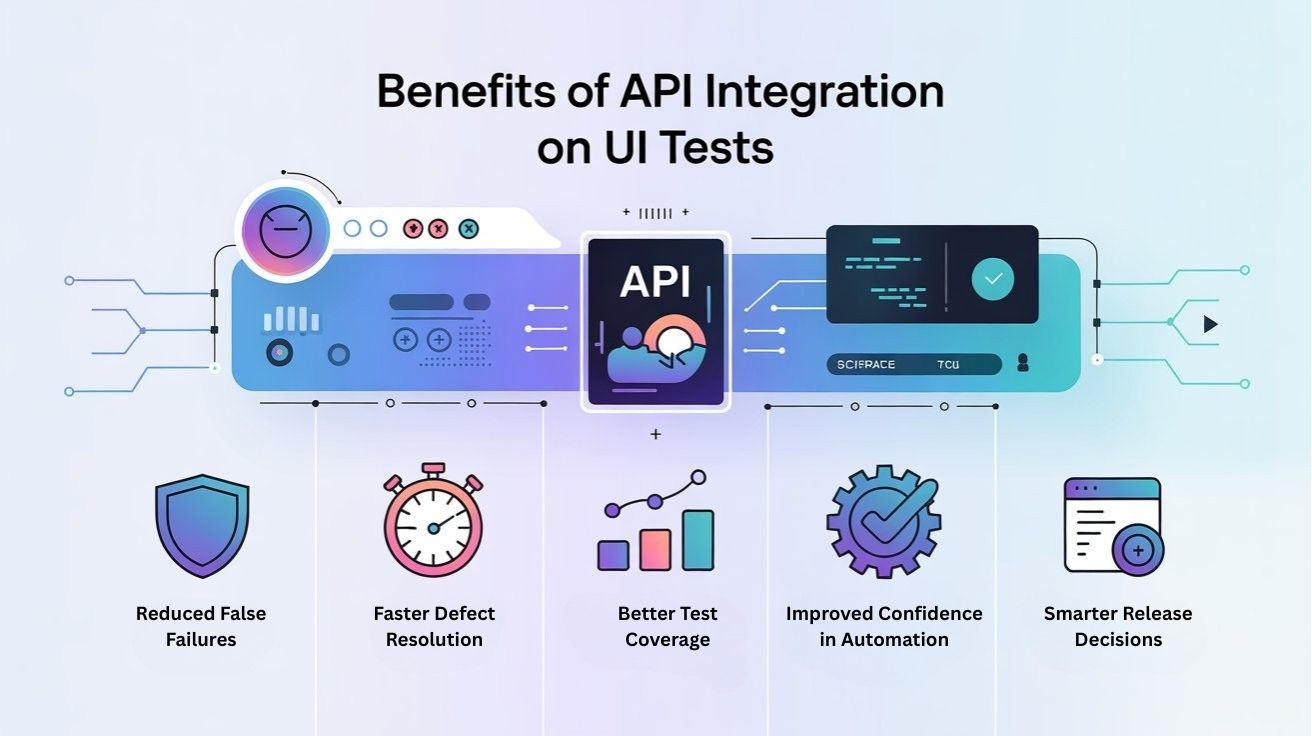
1. Reduced False Failures
By validating or mocking third-party APIs, flaky UI tests decreased significantly. Our test suite now flagged only legitimate application issues.
2. Faster Defect Resolution
With API logs and HAR files attached, developers could reproduce and debug failures quickly. No more back-and-forth or waiting for third-party teams to verify the issue.
3. Better Test Coverage
With more reliable tests, we could expand test coverage confidently. Previously skipped flows (due to flaky third-party services) were now tested regularly.
4. Improved Confidence in Automation
Stakeholders began trusting our CI/CD results. A green build now genuinely reflected a stable application, enabling faster releases and higher team morale.
5. Smarter Release Decisions
By separating application issues from external dependencies, QA could provide more accurate release recommendations, reducing unnecessary delays.
Recommended for You: Selenium interview questions
Lessons Learned
- Not all failures are created equal
Understanding which failures are caused by external systems versus your application is critical. API integration helps identify the root cause early. - Automation needs to be intelligent
UI tests are powerful, but they must account for dependencies. Integrating APIs ensures your tests adapt to real-world complexities. - Collaboration is key
Working closely with development and third-party teams helped us create mock environments and health checks that supported reliable testing. - Evidence matters
Capturing API logs, HAR files, and responses alongside UI evidence accelerated debugging and improved defect quality.

Conclusion
Before API integration, our UI tests were often noisy, unreliable, and frustrating. Every pipeline run felt like gambling with third-party services. Now, with API checks, mocks, and logs integrated into our framework, we can trust our tests and focus on real application quality.
From a tester’s perspective, this was more than a technical improvement—it was a paradigm shift. Automation became smarter, failures became meaningful, and our QA process became proactive rather than reactive.
Integrating APIs into UI tests isn’t just about fixing flaky tests; it’s about engineering stability, improving collaboration, and giving teams confidence in every release.
FAQ
Q1. Why do third-party services make UI tests flaky?
Third-party services can be slow, unstable, or temporarily unavailable. When your UI tests depend on them directly, any delay or outage can cause false failures, even if your own application is working correctly. This leads to noisy pipelines and wasted debugging effort.
Q2. What does API integration in UI tests actually mean?
API integration means your test framework directly calls and validates third-party APIs alongside UI flows. You can run health checks before UI tests, verify responses, mock non-critical APIs, and capture network logs. This helps you separate real application defects from external dependency issues.
Q3. How does API validation improve the reliability of UI automation?
By validating APIs first, you know whether a failure is caused by your code or a third-party outage. Tests can skip or soft-fail when external services are down, while still running unaffected scenarios. This reduces false positives and makes your automation results more trustworthy for stakeholders.
Q4. What are some best practices for handling third-party failures in tests?
Map all critical dependencies, add API pre-checks, use mocks or sandbox environments for non-critical flows, and collect API logs or HAR files with each failure. Integrating this into CI/CD ensures your pipeline reflects real issues instead of random third-party instability.
Q5. How does integrating APIs into CI/CD pipelines help QA teams?
When API checks run as part of CI/CD, every build has clear context: whether third-party services are healthy or not. QA can give more accurate release recommendations, developers debug faster with attached logs, and the team gains confidence that a green pipeline truly reflects application stability.
We Also Provide Training In:
- Advanced Selenium Training
- Playwright Training
- Gen AI Training
- AWS Training
- REST API Training
- Full Stack Training
- Appium Training
- DevOps Training
- JMeter Performance Training
Author’s Bio:

Content Writer at Testleaf, specializing in SEO-driven content for test automation, software development, and cybersecurity. I turn complex technical topics into clear, engaging stories that educate, inspire, and drive digital transformation.
Ezhirkadhir Raja
Content Writer – Testleaf