Flaky UI tests have always been the villain in automation stories. They fail at 2 AM in CI, not because the feature is broken, but because some little CSS class or DOM structure changed. Traditionally, we fought this with better locators, better wait strategies, and better coding practices.
Now, there’s a new ally joining the fight: AI-assisted selector generation and self-healing tests.
Imagine this: instead of you manually updating selectors after every UI tweak, your tool automatically figures out which element you meant to interact with and updates the selector for you. That’s the promise of One Tool + AI.
What is AI-assisted selector generation?
AI-assisted selector generation means your test tool uses machine learning and heuristics to:
- Analyze the page structure
- Understand element attributes (id, class, text, aria labels, position)
- Suggest the best locator for a given element
- Potentially auto-generate selectors that are more stable than naive XPaths

Instead of manually inspecting the DOM to decide how to locate a button, you can:
- Click on the element via a recorder or inspector
- Let the AI suggest a high-quality locator (e.g., based on role, text, data attributes, etc.)
- Optionally refine or approve it
This can significantly speed up test authoring, especially for large and complex UIs.
More Insights: manual testing interview questions
What does “self-healing” mean in tests?
Self-healing tests are those that detect when a locator stops working and automatically attempt to:
- Find the intended element using other signals (text, relative position, nearby labels, previous DOM snapshots).
- Update the stored locator so future runs don’t fail for the same reason.
Example scenario:
- Original locator: //button[@id=’loginBtn’]
- Dev changes the id to loginPrimaryButton but keeps text “Login” and position similar.
- On the next run, the tool notices:
- The element with id=’loginBtn’ is gone.
- There is a button with similar characteristics (“Login” text, same section, similar CSS).
- The AI decides it’s a high-confidence match and updates the locator.
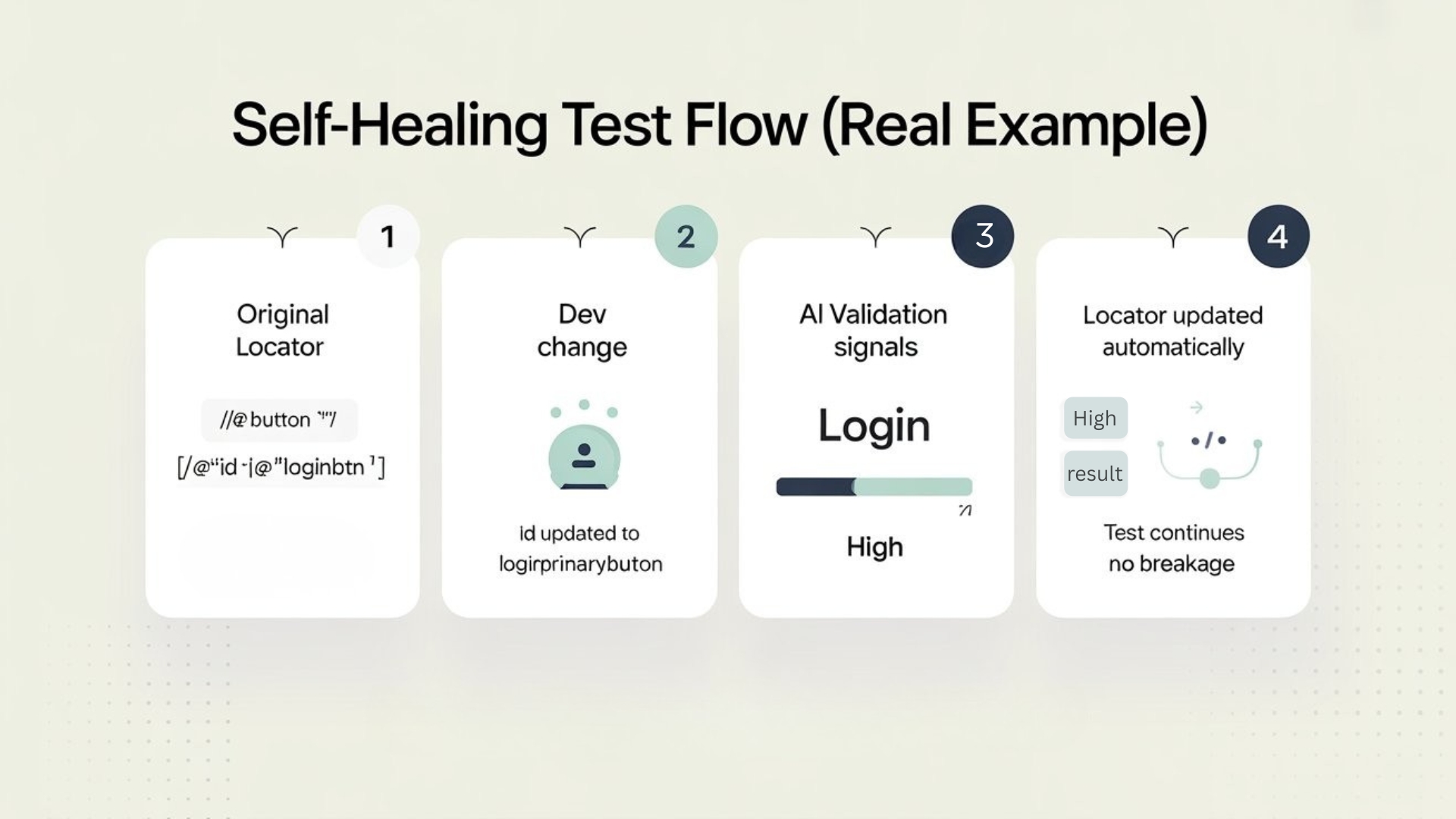
Result: the test doesn’t break; it “heals” itself.
How AI decides which element is the right one
A good AI-based engine doesn’t rely on just one signal. It typically looks at:
- Text content
- Tag type (button, input, link, etc.)
- Nearby elements and their text
- Attributes (id, name, data attributes, aria roles)
- DOM hierarchy and relative structure
- Historical snapshots of the page (if stored)
It builds a fingerprint of the element and then uses that fingerprint to find the closest match when the original locator fails.
Benefits for QA teams
Adopting AI-assisted selectors and self-healing can:
- Cut down maintenance effort after UI changes.
- Reduce false failures caused by locator breaks.
- Speed up test creation (less time spent manually crafting locators).
- Allow testers to focus more on test scenarios and coverage, instead of selector plumbing.
This is especially valuable in fast-moving product teams where UI changes frequently.
Where human judgment still matters
AI isn’t magic. It can guess, but it doesn’t fully understand business context. That means:
- Self-healing must have sensible limits:
- Only update selectors when confidence is high.
- Prefer interactive review for critical flows (e.g., login, payments).
- Testers should review and approve major changes to important locators.
- You still need a good baseline: stable hooks (data-testid, roles) make AI’s job easier.
Think of AI as a super-helper, not a replacement for good test design.
Continue Reading: playwright interview questions
Designing tests for an AI+selector future
To get maximum value from AI-based tools:
- Continue to use good test hooks (data-testid, roles, labels).
- Avoid anti-patterns like:
- Random ids
- Overloaded classes (same class everywhere)
- Keep tests modular, with locators centralized (Page Object / Screenplay / component-level abstractions).
- Leverage AI more for:
- Suggesting initial locators
- Healing in low-risk areas
- Exploratory test creation
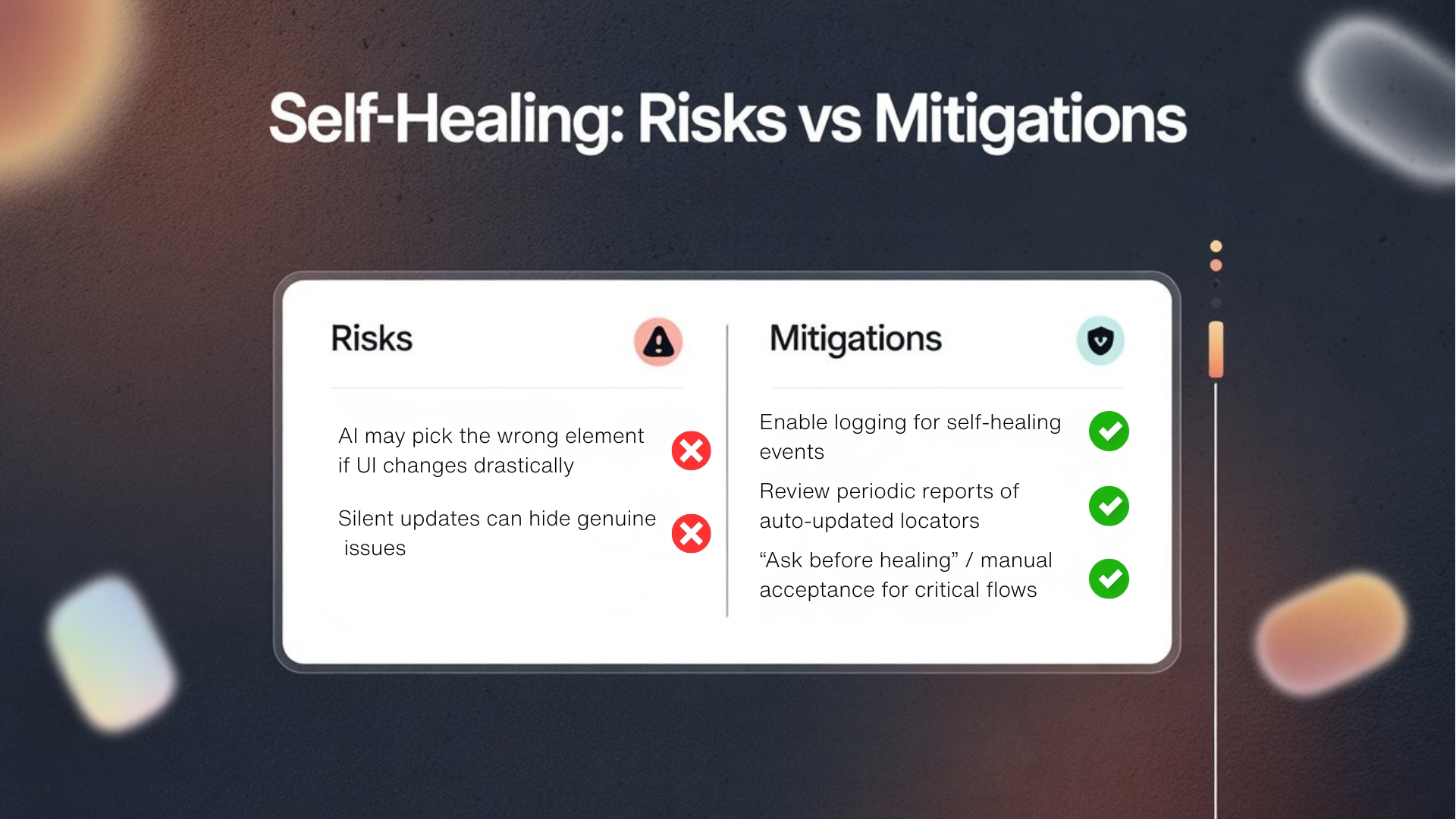
Potential risks and how to control them
Risks:
- The AI may sometimes pick the wrong element if the UI changes drastically.
- Silent updates can hide genuine issues.
Mitigations:
- Enable logging for self-healing events.
- Review periodic reports: which locators were auto-updated?
- For business-critical flows, configure “ask before healing” or require manual acceptance of changes.
The future: One Tool + AI as your automation co-pilot
We’re moving towards an era where your automation stack is not just a tool, but a co-pilot:
- It helps you write tests faster.
- It keeps your locators healthy as the UI evolves.
- It surfaces smart insights: “these 10 tests frequently heal the same element – maybe the UI needs a better hook.”
When you combine strong foundational practices (good locators, test hooks, clear strategies in Selenium and Playwright) with AI-assisted selector generation and self-healing, you get the best of both worlds:
- Human clarity in test design.
- Machine efficiency in maintenance.
Flaky tests may never disappear entirely, but with One Tool + AI, you can move from constantly fixing broken selectors to actually focusing on what matters: finding real bugs and shipping with confidence.
FAQs
1) What are self-healing tests?
Self-healing tests automatically recover when a locator breaks by finding the intended element using other signals, then updating the locator for future runs.
2) What is AI-assisted selector generation?
It’s when a tool suggests stable locators by analyzing the page structure, attributes, roles, and text—reducing reliance on brittle XPaths.
3) Do self-healing tests remove the need for good locators?
No. Stable hooks like data-testid, roles, and labels make self-healing safer and more accurate.
4) Can self-healing choose the wrong element?
Yes, especially after major UI redesigns. That’s why confidence thresholds, logs, and approvals for critical flows are important.
5) How do I control self-healing in critical flows?
Enable “ask before healing,” require manual acceptance, and review auto-update reports for login, payments, and other high-risk journeys.
6) What should I log when self-healing happens?
Log the failed locator, the suggested match, confidence level, what changed, and the updated locator—so teams can review and audit.
7) When is self-healing most valuable?
In fast-moving products where UI changes are frequent and locator maintenance consumes a lot of QA time.
We Also Provide Training In:
- Advanced Selenium Training
- Playwright Training
- Gen AI Training
- AWS Training
- REST API Training
- Full Stack Training
- Appium Training
- DevOps Training
- JMeter Performance Training
Author’s Bio:

Content Writer at Testleaf, specializing in SEO-driven content for test automation, software development, and cybersecurity. I turn complex technical topics into clear, engaging stories that educate, inspire, and drive digital transformation.
Ezhirkadhir Raja
Content Writer – Testleaf