Agile teams do not struggle because they lack tools. They struggle because quality work expands faster than sprint capacity. Requirements shift, regression suites grow, release pressure rises, and testers are expected to move faster without lowering confidence.
That is why AI-driven testing is getting so much attention. But attention is not the same as integration.
Recent industry data shows strong momentum around AI in quality engineering, yet only a small share of organizations have scaled it across the enterprise. That gap is important. It tells us that most teams are still experimenting, still learning where AI fits, and still figuring out how to use it without creating more noise than value.
The real question is not whether AI belongs in testing. It does. The real question is how to integrate AI-driven testing into Agile workflows in a way that improves speed, trust, and decision-making.
How do you integrate AI-driven testing into Agile workflows?
Integrate AI-driven testing into Agile workflows by using AI inside backlog refinement, sprint planning, test design, automation maintenance, execution analysis, and retrospectives—while keeping human review for critical risk and release decisions.
Key takeaways
- AI should be embedded into Agile flow, not treated as a side experiment.
- The best rule is: automate the repetitive, review the critical, trust the proven.
- AI adds value in backlog refinement, sprint planning, test design, triage, and retrospectives.
- Human review still matters most for business risk, compliance, and release trust.
- Success should be measured by better quality decisions, not by AI activity volume.
AI should not sit outside Agile
One common mistake is treating AI as a side experiment. A team tries a few prompts, generates a few test cases, and calls it transformation. But Agile does not reward isolated experimentation. Agile rewards systems that improve the flow of value across the sprint.
If AI is only used occasionally, it becomes novelty. If it is embedded into backlog refinement, test design, regression planning, failure analysis, and retrospectives, it becomes leverage.
That distinction matters. Recent reporting on AI and software delivery suggests AI tends to amplify the quality of the underlying engineering system. In strong workflows, it can accelerate results. In weak workflows, it can magnify inconsistency and rework.
Dive Deeper: playwright interview questions
What AI-driven testing really means
AI-driven testing is not just using AI to write test cases. That definition is too narrow.
In an Agile team, AI-driven testing means using AI to support quality-related decisions throughout the sprint lifecycle. It can help teams interpret requirements, generate test ideas, identify risk patterns, reduce maintenance effort, summarize execution failures, and surface signals that humans may miss under time pressure.
But it should do so inside the workflow, not outside it.
The best principle is simple:
Automate the repetitive. Review the critical. Trust the proven.
That creates the right balance between speed and judgment.

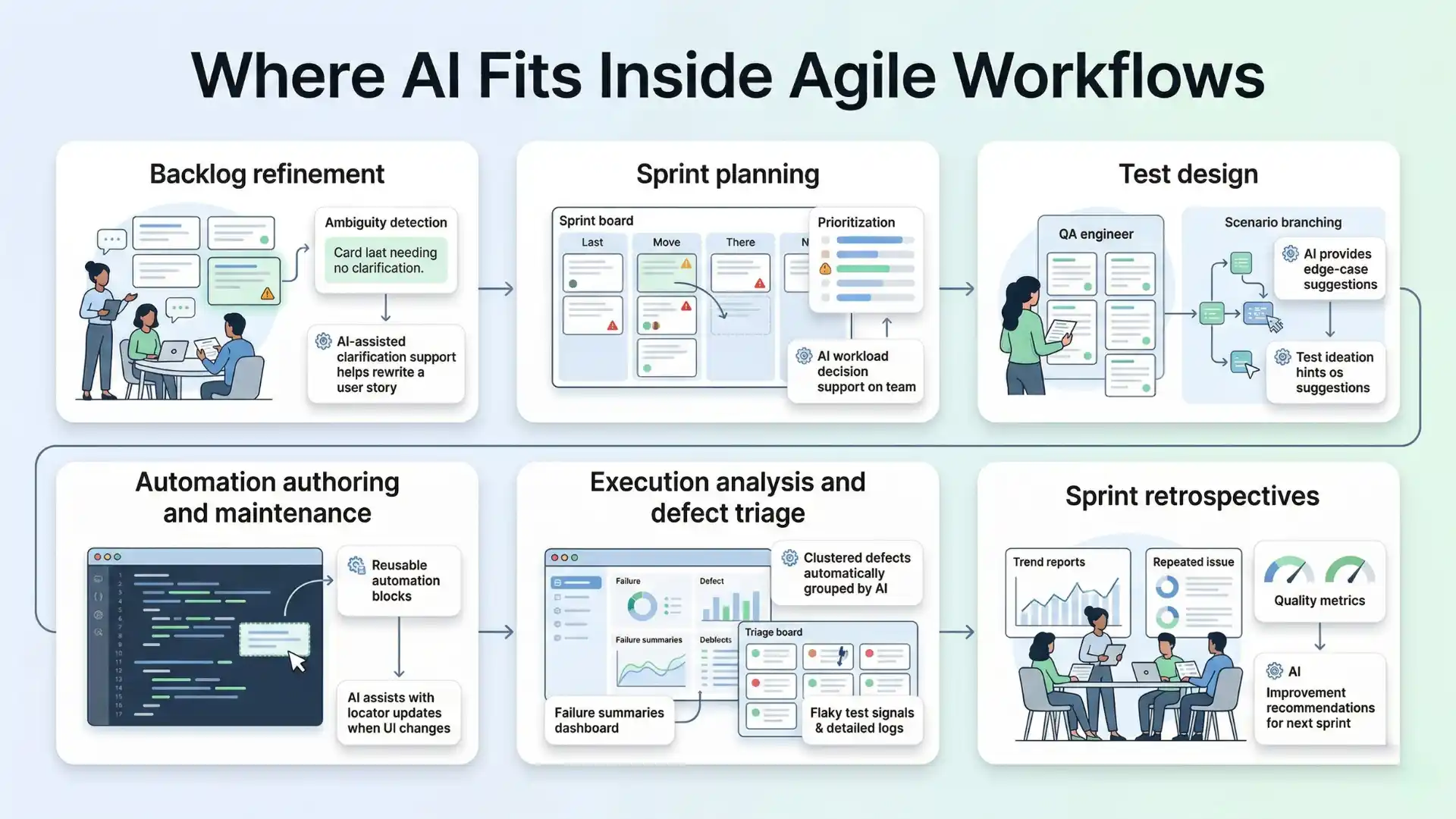
Where AI fits inside Agile workflows
1. Backlog refinement
Quality problems often begin before testing starts. When user stories are vague or acceptance criteria are incomplete, testing becomes reactive later.
AI can help by:
- identifying ambiguity in requirements
- suggesting missing acceptance criteria
- surfacing likely edge cases
- highlighting impacted areas based on past defects
This does not replace the QA engineer or product owner. It improves the conversation before execution begins.
2. Sprint planning
Sprint planning is where teams decide what they will build, what they can test deeply, and where risk is highest.
AI can support planning by:
- estimating regression impact
- identifying high-risk stories
- highlighting dependencies
- grouping similar past defects for reference
This is especially useful when teams need to make smarter testing choices under sprint constraints.
3. Test design
This is where AI often delivers visible early value. It can turn acceptance criteria into candidate test scenarios, suggest negative and boundary flows, and speed up first-pass coverage.
But speed is not the same as relevance.
Generated tests still need human review for:
- business logic accuracy
- product-specific risk
- duplicate coverage
- real execution value
AI is good at generating possibilities. Humans still decide which possibilities matter.
4. Automation authoring and maintenance
AI can help teams draft scripts, suggest locators, improve assertions, and flag likely maintenance issues.
That sounds powerful, but there is an important caution. Automated testing only helps delivery when the automation itself is reliable. Recent reporting notes that testing contributes to software delivery performance when it produces trustworthy feedback, not more flakiness.
That means AI-generated automation still needs engineering discipline. Stability, readability, and review remain essential.
5. Execution analysis and defect triage
As test suites grow, the cost of understanding failures often becomes greater than the cost of running the tests.
This is one of the best use cases for AI.
AI can:
- summarize failures across runs
- cluster duplicate issues
- detect likely flaky patterns
- separate probable environment failures from product failures
- suggest likely root-cause areas
The value here is not just speed. It is signal clarity.
6. Sprint retrospectives
Retrospectives are often underused in QA improvement. Teams remember a few painful incidents but miss the larger pattern.
AI can help by analyzing sprint-level signals such as:
- repeated failure trends
- unstable components
- recurring defect categories
- reviewer corrections to AI-generated outputs
- bottlenecks in test design or triage
That turns retrospectives into a stronger learning loop.
What to automate
The best candidates for AI are tasks that are repetitive, pattern-heavy, and time-consuming.
These usually include:
- first-pass test case generation
- regression prioritization support
- failure summarization
- duplicate defect detection
- automation scaffolding
- maintenance suggestions
These activities benefit from scale and pattern recognition, which is where AI is often strongest.
Don’t Miss Out: manual testing interview questions
What to review
This is where mature teams separate themselves from enthusiastic teams.
Anything tied to business risk, customer trust, or release confidence should still be reviewed carefully by humans. That includes:
- acceptance criteria interpretation
- edge-case importance
- compliance-sensitive scenarios
- exploratory strategy
- release sign-off decisions
- severity assessment for customer-facing defects
AI can recommend. Humans remain accountable.
What to trust
Trust should be earned in layers.
A practical maturity model looks like this:
Level 1: Trust AI for suggestions
Use it to propose tests, summarize failures, and surface risk.
Level 2: Trust AI with review gates
Let AI assist in design and maintenance, but require human approval.
Level 3: Trust AI in bounded workflows
Allow limited action in low-risk areas such as categorization or draft generation.
Level 4: Trust AI where performance is proven
Expand only when quality, stability, and reviewer confidence improve over time.
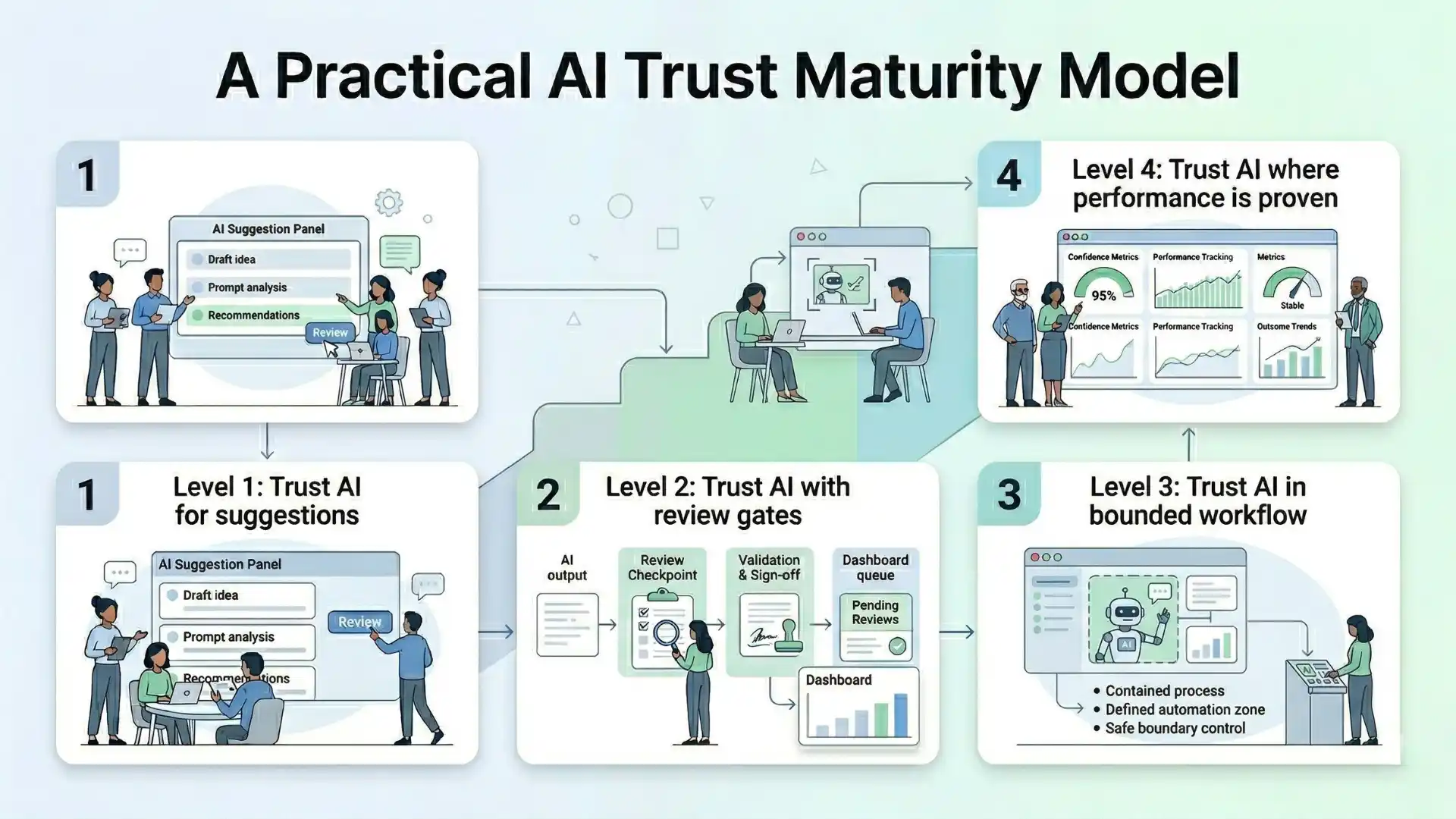
This matters because trust is not a feature. It is an outcome.
Developer workflow data supports this direction: AI tool usage is now common in day-to-day engineering work, but that does not remove the need for oversight, explainability, and disciplined adoption.
You Might Also Like: cts cognizant interview questions
A practical rollout model for Agile teams
The most effective way to integrate AI-driven testing is not to transform everything at once.
Start with one clear friction point:
- unclear requirements
- slow test design
- heavy regression effort
- noisy triage
- automation maintenance drag
Then define the human checkpoints before you scale:
- QA reviews generated scenarios
- leads review automation changes
- release decisions stay human-owned
- high-risk stories require explicit validation
Most importantly, measure the right outcomes:
- reduction in test design time
- triage turnaround time
- flaky test rate
- escaped defects
- reviewer correction rate
- confidence in release readiness
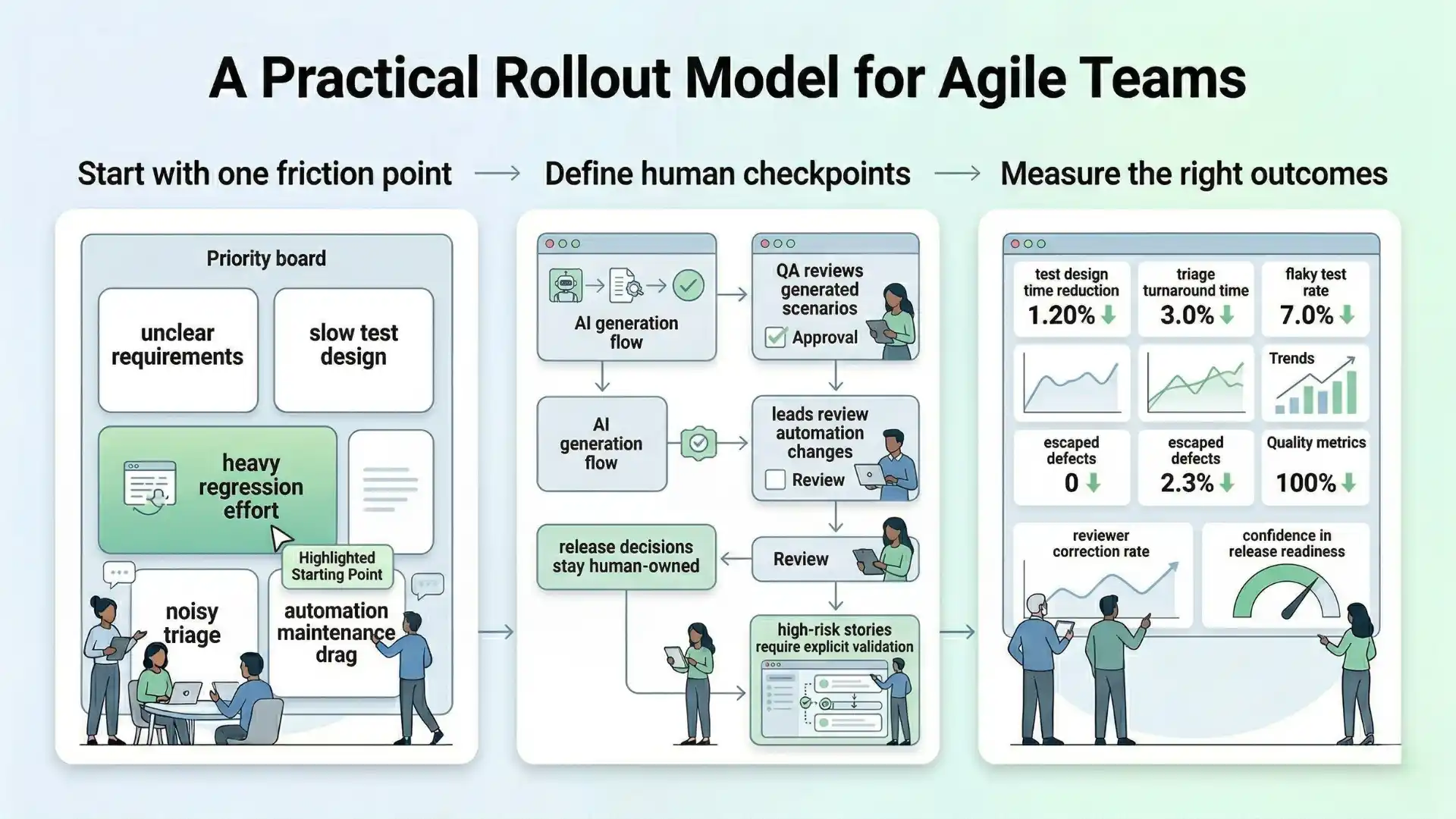
Do not measure success by how many prompts were used or how many tests were generated. Measure whether the team is making better quality decisions, faster.
AI-driven testing improves Agile workflows when teams use AI for repetitive, pattern-heavy work while keeping human ownership over high-risk review, exploratory thinking, and release confidence.
Final thought
AI-driven testing in Agile workflows is not about replacing testers. It is about redesigning how quality moves through the sprint.
When used well, AI can reduce repetition, sharpen focus, and help teams respond faster to change. But it only becomes an advantage when teams are disciplined about where to automate, where to review, and what to trust.
The teams that gain the most from AI will not be the ones that adopt the most tools. They will be the ones that integrate AI into Agile execution with clarity, boundaries, and measurable intent.
That is where speed and trust start to work together.
FAQs
What is AI-driven testing in Agile workflows?
AI-driven testing in Agile workflows means using AI to support quality-related decisions across backlog refinement, sprint planning, test design, triage, maintenance, and retrospectives.
What should teams automate with AI in testing?
Teams should automate repetitive, pattern-heavy work such as first-pass test generation, regression prioritization support, failure summarization, duplicate defect detection, and automation scaffolding.
What should still be reviewed by humans?
Humans should review business-risk interpretation, compliance-sensitive scenarios, exploratory strategy, release decisions, and customer-facing defect severity.
Can AI replace testers in Agile teams?
No. AI is a support layer that improves speed and signal clarity, while humans remain accountable for judgment, trust, and release confidence.
How should Agile teams build trust in AI?
Agile teams should build trust in layers: first for suggestions, then with review gates, then in bounded workflows, and only expand when performance and confidence improve over time.
We Also Provide Training In:
- Advanced Selenium Training
- Playwright Training
- Gen AI Training
- AWS Training
- REST API Training
- Full Stack Training
- Appium Training
- DevOps Training
- JMeter Performance Training
Author’s Bio:

Content Writer at Testleaf, specializing in SEO-driven content for test automation, software development, and cybersecurity. I turn complex technical topics into clear, engaging stories that educate, inspire, and drive digital transformation.
Ezhirkadhir Raja
Content Writer – Testleaf