If you run Playwright in CI at scale, you’ve seen this movie.
✅ Test fails
✅ You open the screenshot
✅ Instead of the dashboard… you’re staring at the login page
And suddenly everyone wonders: “Did we break prod?”
Most of the time, you didn’t.
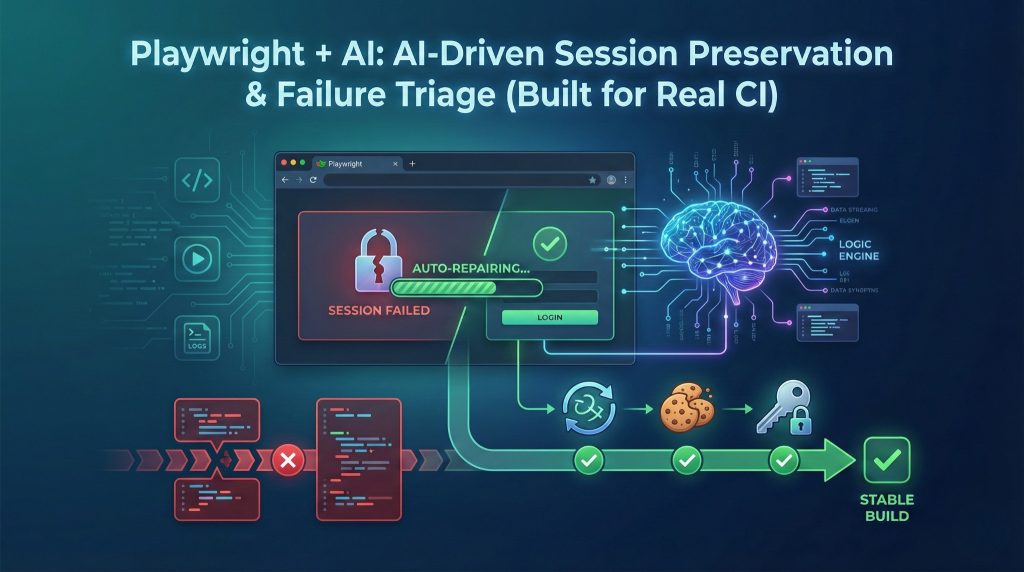
What you hit is an auth/session artifact—a flaky failure that looks like a regression, but isn’t. This post is a practical guide to turning those “mystery failures” into fast, repeatable diagnosis using a simple combo:
Rules-first triage + AI summaries + safe smart retries.
Why this keeps happening (even with storageState)
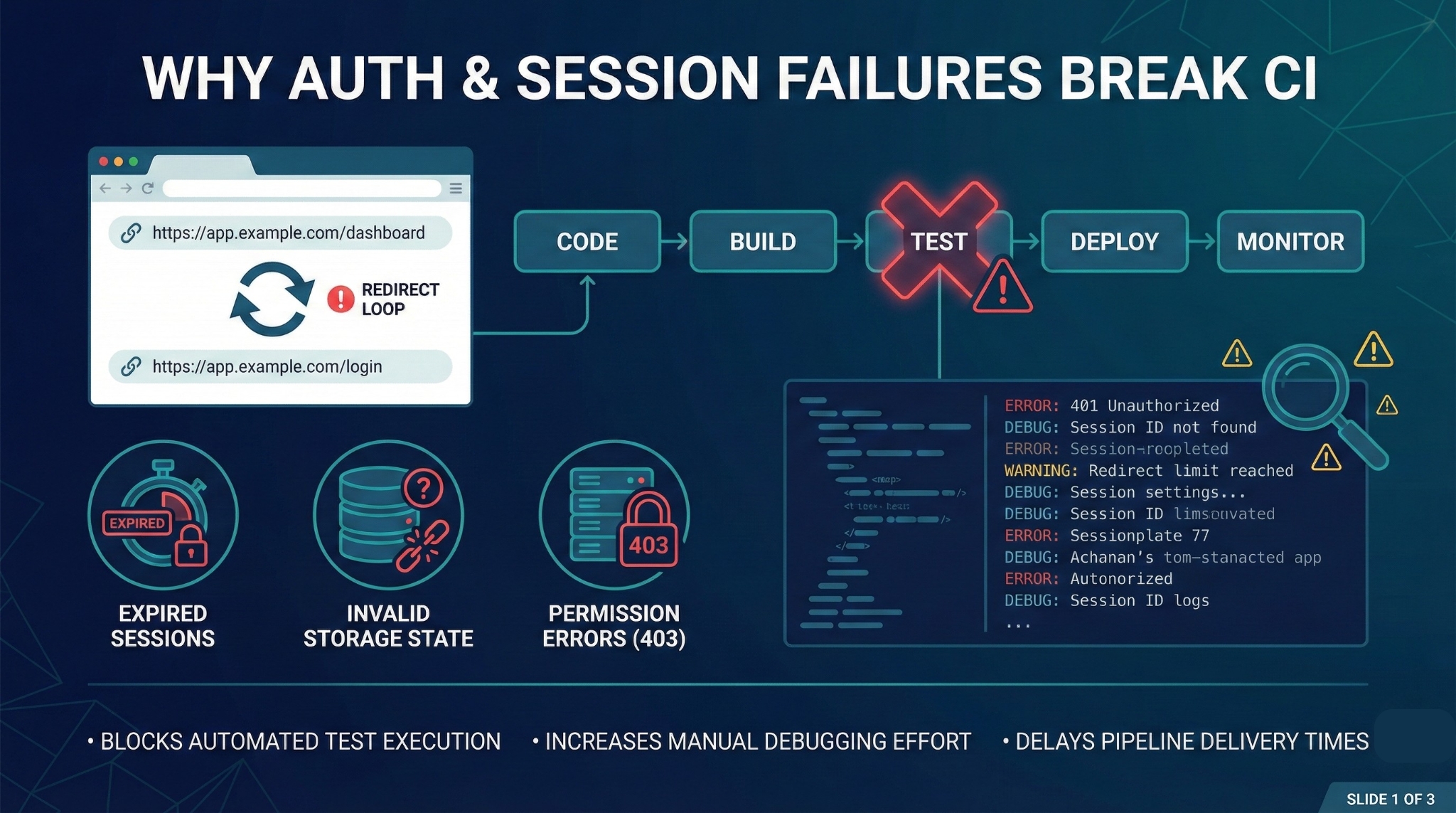
Even with clean login design and storageState, Playwright suites still fail for reasons like:
- Session expired earlier than expected
- Storage state not applied (wrong context, stale state, wrong worker)
- Redirect loops back to /login
- 403 “Access denied” (role/permission mismatch)
- Environment instability (auth service hiccups, timeouts that look like auth)
Traditionally, a human has to:
- open logs and screenshots,
- replay the trace,
- guess the root cause,
- re-run the pipeline “just to confirm.”
That’s expensive. And it’s repeated… every day.
So here’s the better approach:
Don’t make every failure a detective story.
Make failures fall into known buckets with known fixes.
Popular Articles: playwright interview questions
1) What “session preservation” actually means
In this context, session preservation means:
Keeping a test run consistently authenticated so tests don’t accidentally run as an anonymous user.
Important nuance:
storageState doesn’t keep sessions alive.
It’s a snapshot (cookies + localStorage) captured at a moment in time.
It becomes stale when:
- cookies expire,
- tokens rotate or refresh fails,
- sessions get invalidated after deployments,
- long parallel runs reuse outdated state files.
Where AI helps is not “logging in for you,” but watching your runs and pointing to patterns like:
- “These 15 failures match auth/session behavior, not regression bugs.”
- “This suite’s auth.json expires mid-run—refresh cadence is too low.”
2) What “failure triage” means (and why it matters)
Failure triage is the art of classifying failures into actionable buckets instead of staring at a stack trace.
Instead of “Timeout 30s” you want:
- Auth issue
- Permission issue
- Locator issue
- Perf/timeout
- App bug / environment
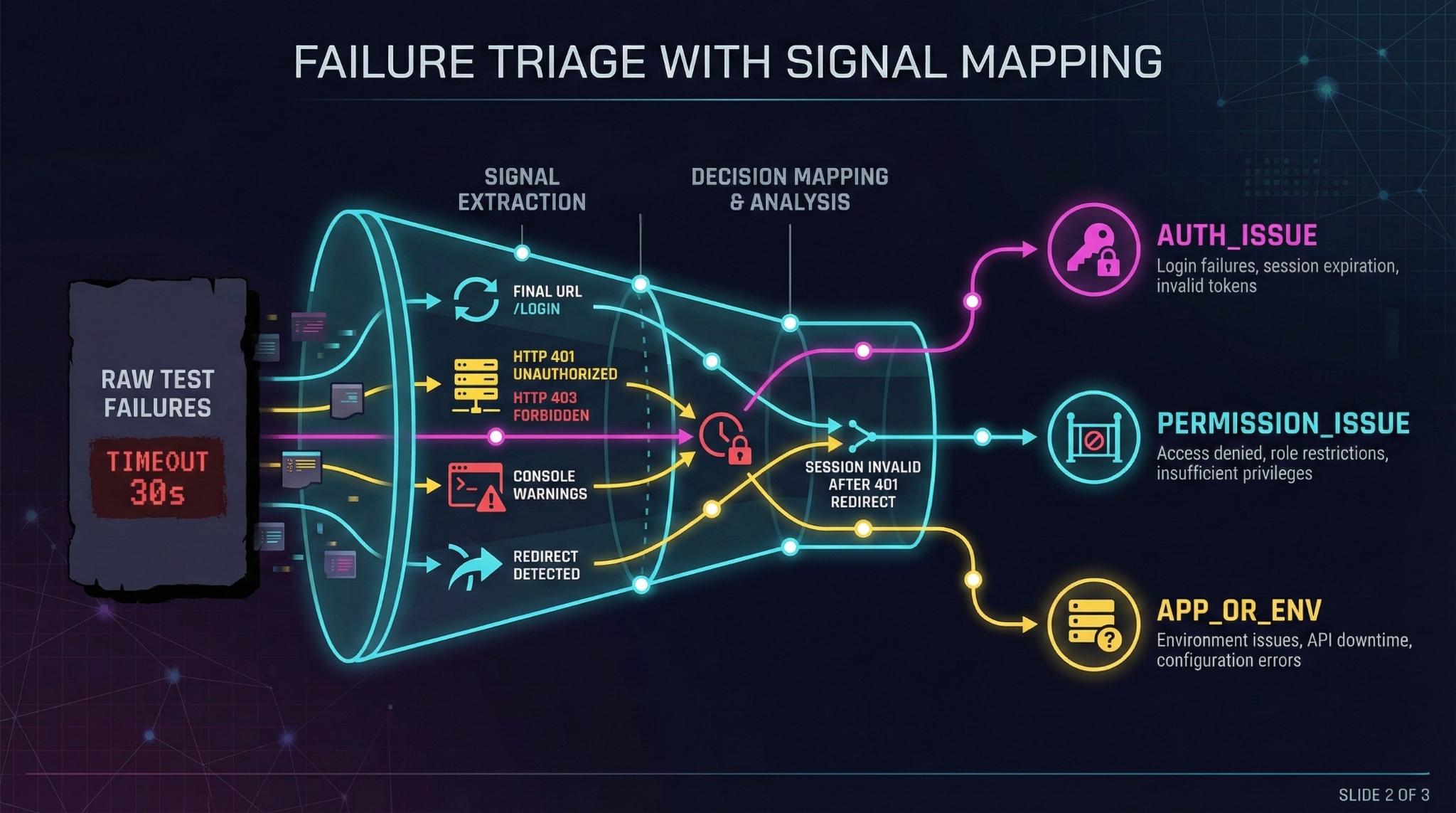
The goal is a single high-signal line:
“User session was invalid → /orders redirected to /login after a 401.”
That one sentence can save 10–15 minutes per failure.
Other Helpful Articles: AI and ML engineer salary in india 2026
3) The Signal Map (the backbone of reliable triage)
Before you go “full AI,” start with a simple signal map. It gives you fast wins and makes AI more accurate.
| Signal observed | What it usually means | Bucket |
| Final URL is /login or contains returnUrl= | Session invalid or not applied | AUTH_ISSUE |
| Redirect chain includes 302 → /login | Session expired on protected route | AUTH_ISSUE |
| API returns 401 on key endpoints (/me, /session) | Token expired / state stale | AUTH_ISSUE |
| API returns 403 (especially on admin routes) | Role/permission mismatch | PERMISSION_ISSUE |
| UI text: “Sign in again” / “Session expired” | App logged user out | AUTH_ISSUE |
| 500/503 spikes | Real app issue or outage | APP_OR_ENV |
Key idea: You don’t need an LLM to discover obvious signals.
Use rules for speed. Use AI for summarizing and guidance.
4) Practical implementation: Rules-first + AI second
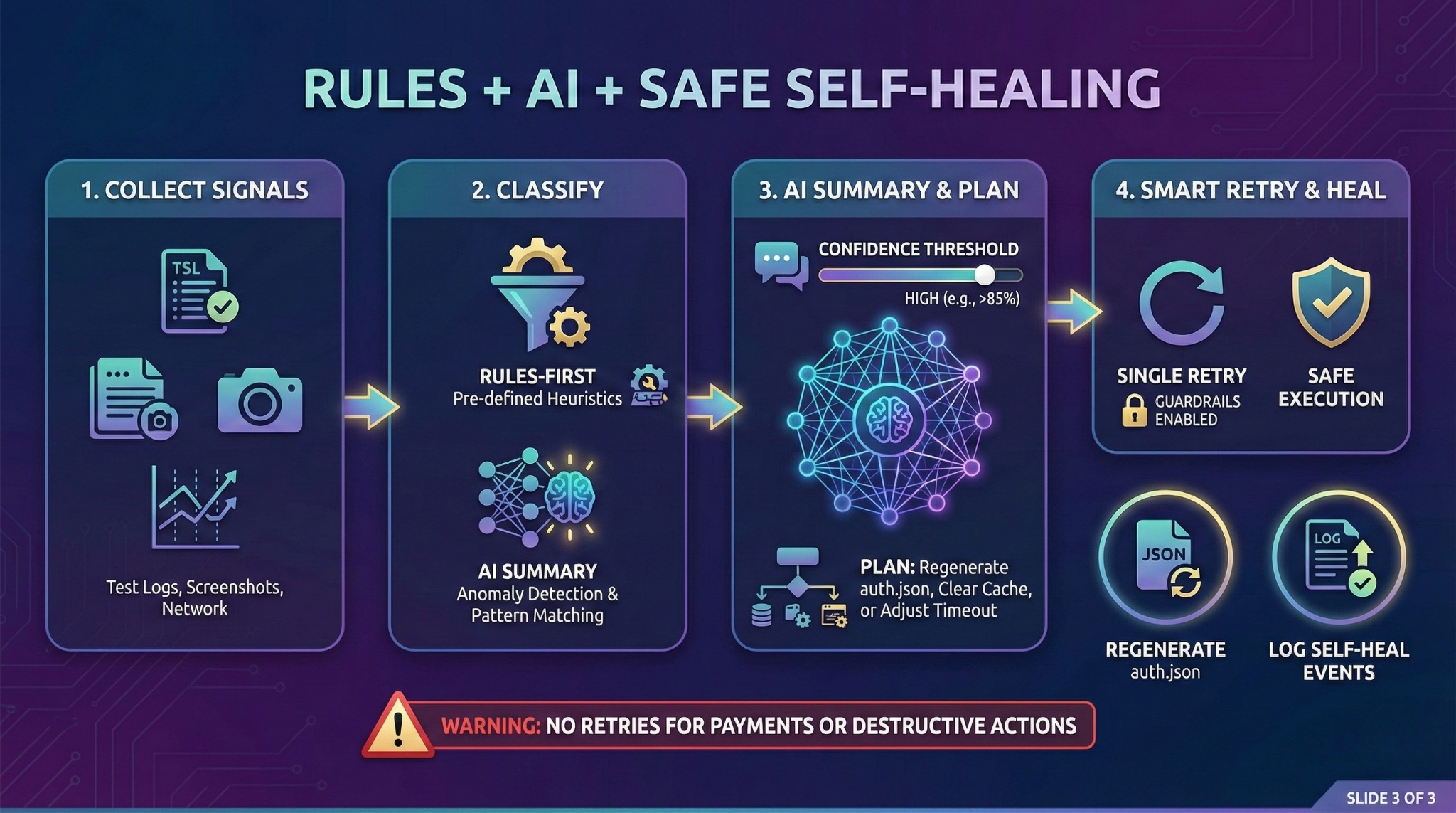
A 10/10 CI approach looks like this:
- Collect a small set of high-signal context when a test fails
- Classify quickly using rules
- Ask AI for a structured summary + recommendation
- Attach it to reports / Slack / CI logs
- Optionally self-heal with guardrails (retry once)
Step 1: Collect failure signals (URL + UI hint + console + network)
// helpers/triageSignals.ts

import { Page } from "@playwright/test";

export function wireCollectors(page: Page) {

  const consoleErrors: string[] = [];

  const suspiciousResponses: { url: string; status: number }[] = [];

  page.on("console", (msg) => {

    if (msg.type() === "error") consoleErrors.push(msg.text());

  });

  page.on("response", (res) => {

    const status = res.status();

    if ([401, 403, 500, 502, 503].includes(status)) {

      suspiciousResponses.push({ url: res.url(), status });

    }

  });

  return { consoleErrors, suspiciousResponses };

}

export async function collectFailureSignals(page: Page, collectors: ReturnType<typeof wireCollectors>) {

  const finalUrl = page.url();

  const pageTitle = await page.title().catch(() => "");

  const uiAuthHint = await page

    .locator("text=/session expired|sign in again|access denied|login/i")

    .first()

    .isVisible()

    .catch(() => false);

  return {

    finalUrl,

    pageTitle,

    uiAuthHint,

    consoleErrors: collectors.consoleErrors.slice(-10),

    suspiciousResponses: collectors.suspiciousResponses.slice(-15),

  };

}
Step 2: Classify by rules (fast baseline)
// helpers/rules.ts

export function classifyByRules(signals: { finalUrl: string; uiAuthHint: boolean; suspiciousResponses: {status:number}[] }) {

  const isLogin = /\/login\b/i.test(signals.finalUrl) || /returnUrl=/i.test(signals.finalUrl);

  const has401 = signals.suspiciousResponses.some(r => r.status === 401);

  const has403 = signals.suspiciousResponses.some(r => r.status === 403);


  if (isLogin || has401 || signals.uiAuthHint) return { bucket: "AUTH_ISSUE", confidence: 0.85 };

  if (has403) return { bucket: "PERMISSION_ISSUE", confidence: 0.8 };


  return { bucket: "UNKNOWN", confidence: 0.3 };

}
Continue Reading: Top 10 product based companies in chennai
Step 3: Attach it to the report (so humans and AI can consume it)
// example.spec.ts

import { test } from "@playwright/test";

import { wireCollectors, collectFailureSignals } from "./helpers/triageSignals";

import { classifyByRules } from "./helpers/rules";

test.beforeEach(async ({ page }, testInfo) => {

  (testInfo as any)._collectors = wireCollectors(page);

});

test.afterEach(async ({ page }, testInfo) => {

  if (testInfo.status !== testInfo.expectedStatus) {

    const collectors = (testInfo as any)._collectors;

    const signals = await collectFailureSignals(page, collectors);

    const ruleVerdict = classifyByRules(signals);


    testInfo.attach("failure-signals.json", {

      body: JSON.stringify({ signals, ruleVerdict }, null, 2),

      contentType: "application/json",

    });

  }

});
5) Where AI fits (without becoming risky)
Here’s the simple rule:
✅ Send signals
❌ Don’t send secrets
What AI should ingest (safe inputs)
- final URL + redirect indicators
- sanitized console errors
- key network status codes (401/403/500)
- page title + tiny UI hints
Do NOT send: raw tokens, passwords, full DOM dumps with customer data.

What AI should output (useful summary)
A great AI response is structured:
- Bucket: AUTH_ISSUE (0.86)
- Evidence: /orders → 302 → /login, 401 on /api/me
- Likely cause: stale storageState
- Recommendation: refresh auth state before suite; retry once
Also: AI should be probabilistic. Treat it as triage help—not truth.
You Might Also Like: Automation testing interview question
6) The safe “Smart Retry” loop (the real win)
Most pipelines retry everything. That’s lazy and dangerous—it can hide real bugs.
A smart retry has guardrails:
- Test fails
- Rules/AI says: AUTH_ISSUE with confidence ≥ 0.8
- Refresh session (regenerate auth.json)
- Retry exactly once
- Log the self-heal event so engineers can fix root cause later
Critical rule: Never auto-retry irreversible flows
(e.g., “Submit Payment”, “Delete User”, “Place Order”)
7) About Playwright traces (use them properly)
Traces are excellent—but they’re heavy .zip artifacts.
Best practice:
- Store trace .zip in CI as usual
- Prefer runtime-captured signals first (console/response/url)
- If needed, parse trace later to enrich reporting
- Post AI summaries to Slack / PR comments / dashboards
This keeps costs down and security tight.
Conclusion
Authentication issues are the hidden killers of UI test reliability.
Playwright gives you the mechanics (storageState, globalSetup, traces).
AI gives you the intelligence: triage, pattern recognition, and fast summaries.
With rules-first signals + AI summarization, you can:
- detect session failures quickly,
- stop treating auth flakes like regressions,
- safely self-heal common auth failures,
- and reduce time spent debugging false positives.
You still own test design.
But AI becomes the analyst that watches every run and tells you what actually happened.
If you’re considering a playwright course online, this is the exact kind of CI-ready skill that pays off—knowing how to diagnose auth flakes, apply safe guardrails, and keep pipelines green without hiding real bugs. Also, join our Playwright + AI webinar “Worried about your testing career in 2026?” to see these workflows (signal-based triage, AI summaries, and smart retries) demonstrated with real examples you can reuse in your own projects.
FAQs
1) What is “session preservation” in Playwright CI?
Session preservation means keeping tests consistently authenticated so they don’t accidentally run as anonymous users during a CI run.
2) Does Playwright storageState keep a session alive?
No. storageState is a snapshot of cookies and localStorage captured at a point in time—it can become stale as cookies expire or tokens rotate.
3) Why do Playwright tests still hit the login page in CI?
Common causes include early session expiry, storage state not applied correctly, redirect loops to /login, permission mismatches (403), and environment instability.
4) What is failure triage in automation testing?
Failure triage is classifying failures into actionable buckets (auth, permission, locator, perf/timeout, app/env) instead of staring at generic errors like “Timeout 30s.”
5) What are the best signals to detect auth/session failures?
Use a signal map: final URL /login or returnUrl=, redirect chain 302 → /login, and 401 responses on key endpoints like /me or /session.
We Also Provide Training In:
- Advanced Selenium Training
- Playwright Training
- Gen AI Training
- AWS Training
- REST API Training
- Full Stack Training
- Appium Training
- DevOps Training
- JMeter Performance Training
Author’s Bio:

Content Writer at Testleaf, specializing in SEO-driven content for test automation, software development, and cybersecurity. I turn complex technical topics into clear, engaging stories that educate, inspire, and drive digital transformation.
Ezhirkadhir Raja
Content Writer – Testleaf